

Updated October 2026
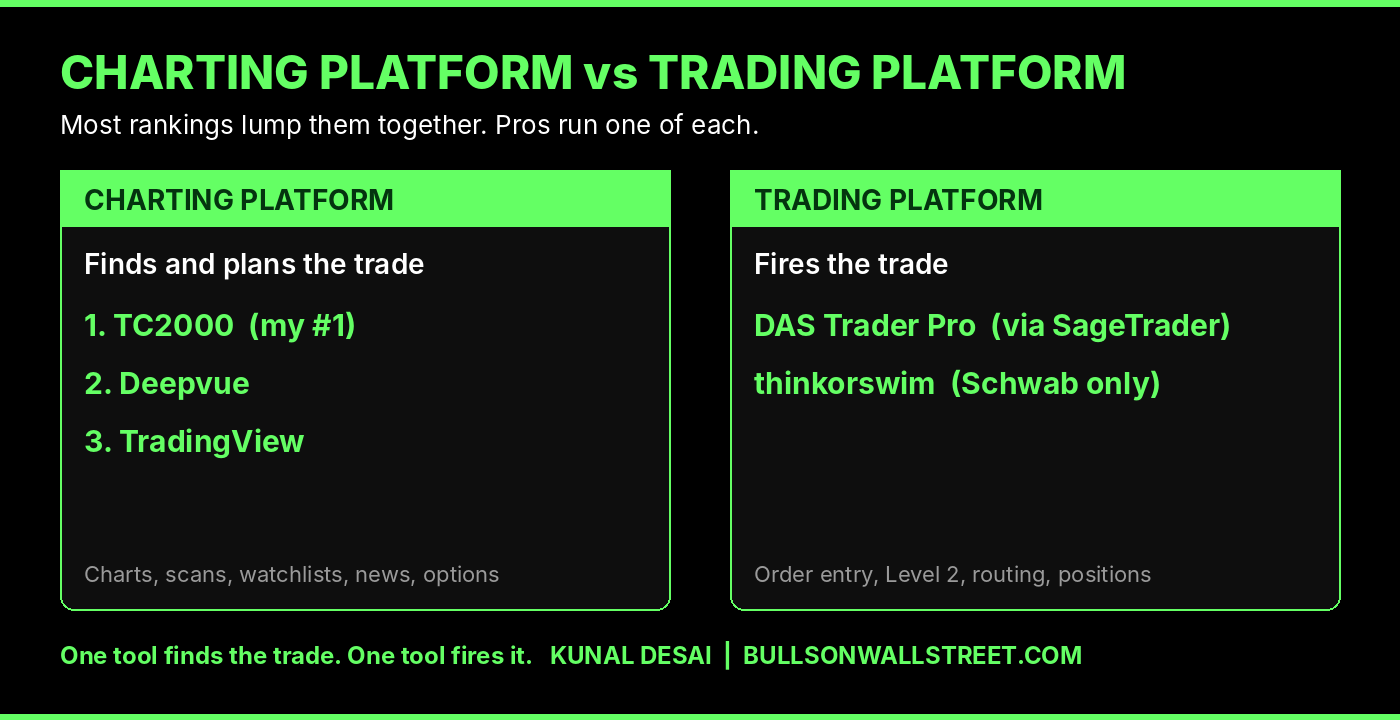
The best charting software for day trading in 2026 is TC2000, followed by Deepvue and TradingView. I have traded full time since 2007, and TC2000 is the screen I analyze, scan and plan every trade from. One thing most rankings get wrong: DAS Trader and thinkorswim are trading platforms that connect to a broker. They have charts, but charting is not their job.
That distinction is the whole post. Get it wrong and you end up paying for two tools that do half of each other's work, or worse, staring at blocky broker charts all day and wondering why you can't see the setup.
TL;DR
- My #1 charting platform for day trading is TC2000. Modular layouts, real scanning, options charts and news in one place. I run Premium+ at $99.99 a month; most traders only need Premium at $49.99.
- #2 is Deepvue. I paid for it for over a year. Beautiful layout, famous-trader scan presets, model books and a brand-new journal. It is built mainly for swing and growth traders, and I cancelled only because TC2000 already covers my day.
- #3 is TradingView. I still pay for it. Great mobile app, crypto quotes, every market under one roof. The scanning layout is where it falls apart.
- DAS Trader and thinkorswim are not charting platforms. DAS is the order-entry software I execute through on SageTrader. thinkorswim is Schwab's trading platform, locked to a Schwab account.
- The pro setup is two tools: a charting platform to find and plan the trade, and a trading platform to fire it.
Quick Facts
- Ranked by: Kunal Desai, founder of Bulls on Wall Street, full-time trader since 2007, 7,000+ students taught since 2008
- Ranking: 1. TC2000, 2. Deepvue, 3. TradingView
- Trading platforms covered separately: DAS Trader Pro, thinkorswim
- My execution: DAS Trader on SageTrader Pro, plus a second account on BlackArrow through TheTradeMakers
- My TC2000 plan: Premium+ ($99.99 a month)
- Pricing checked: October 18, 2026
- Every screenshot in this post: my own screens, showing the October 16, 2026 session
Charting Platforms vs Trading Platforms: The Mistake Everyone Makes
Every ranking I read for this post lumps TradingView, thinkorswim, NinjaTrader and DAS into one top-ten list. That is like ranking a scope and a trigger against each other.
A charting platform has one job. Find the stock, read the chart, scan the market, plan the trade. TC2000, Deepvue, TradingView and TrendSpider live here.
A trading platform has a different job. Get your order to the market fast and manage the position. DAS Trader and thinkorswim live here. They connect to a broker, they carry charts because traders want something to look at while they click, but the charts are a side dish.
Here is the setup I run every morning. TC2000 on most of my screens. DAS montages next to it, with a couple of simple DAS charts for context. TC2000 tells me what to trade. DAS is how I trade it.
How I Ranked Them
I ranked on what matters in a real trading day, not on feature-list length:
- Layout control. Can I build the screen my process needs, or am I stuck with the vendor's idea of a screen?
- Scanning. How fast does a scan go from idea to a list of names I can actually look at?
- Chart quality. Can a new trader see the setup? Can I see it in two seconds?
- Everything in one place. Options, news, notes, breadth. Every tab you switch is a trade you are late on.
- Price at the tier a day trader actually needs.
I'm very intentional about how I use things. I have a layout for everything I do. That is the lens for this whole ranking.
1. TC2000: Best Charting Software for Day Trading
TC2000 is where my day starts and ends. Nothing else is close.
It is modular, and that changes everything
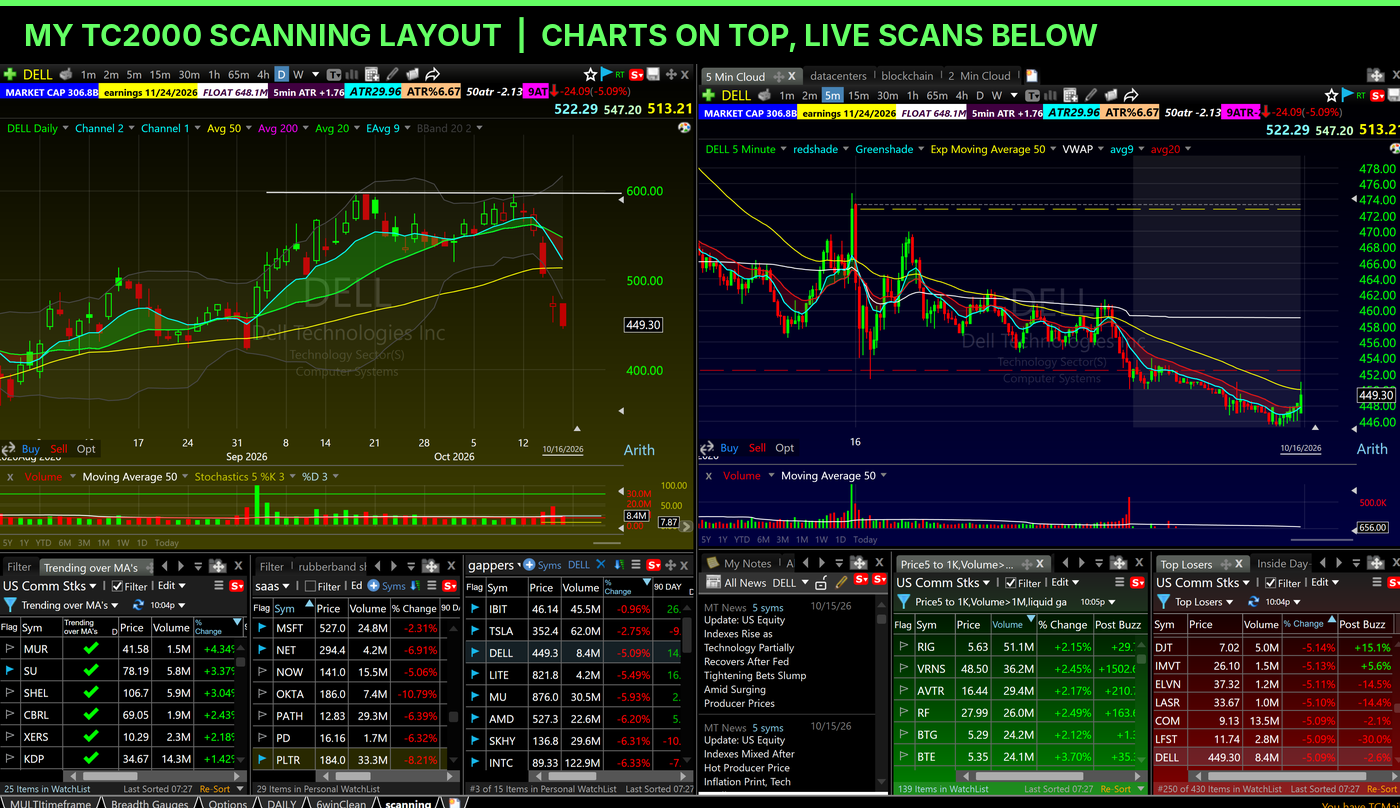
Every window in TC2000 is a module. Charts, watchlists, scans, news, notes, gauges. You size each one, drag it wherever you want, stack it above the chart, beside it, between two charts. I keep my scans along the bottom and my charts on top because that is how my eyes work. Yours might work differently, and TC2000 lets you build that.
Then you save it as a layout and give each layout a job. I run separate layouts for the daily market review, scanning, the six names I'm watching, and options. Each one even has its own color scheme so I know where I am at a glance.
My trading day in four TC2000 layouts
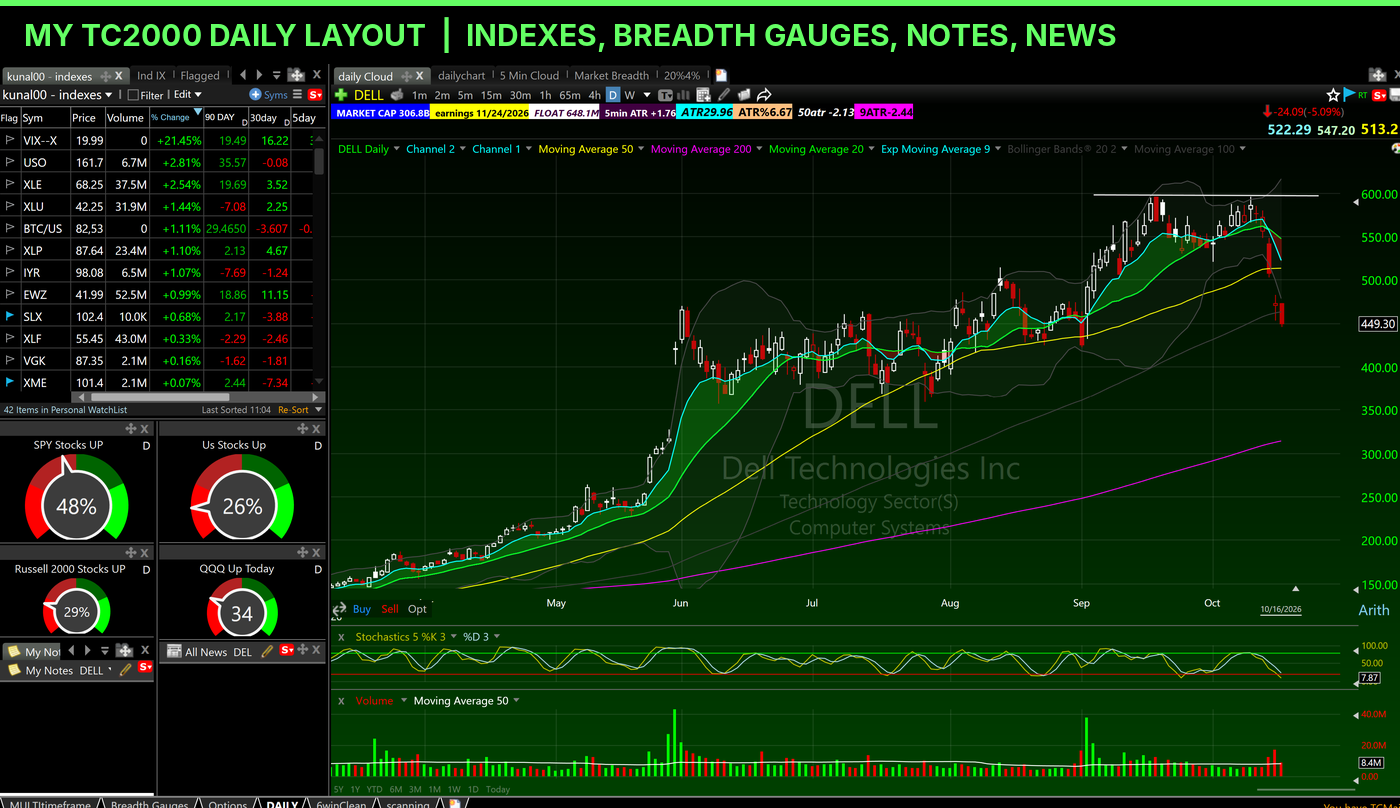
1. Daily. Indexes and sector ETFs down the left side with 90-day, 30-day and 5-day performance. Market breadth gauges below that: what percent of SPY stocks, all US stocks, Russell 2000 stocks and QQQ stocks are up today. A notes panel and a news panel. This is the health check before I look at a single setup.
2. Scanning. Charts up top, every scan along the bottom: Trending over MA's, a rubberband list, gappers, a liquid price-and-volume filter, Top Losers, Inside Day. The All News pane pulls MT Newswires headlines tied to my symbols, so the catalyst sits right next to the chart.
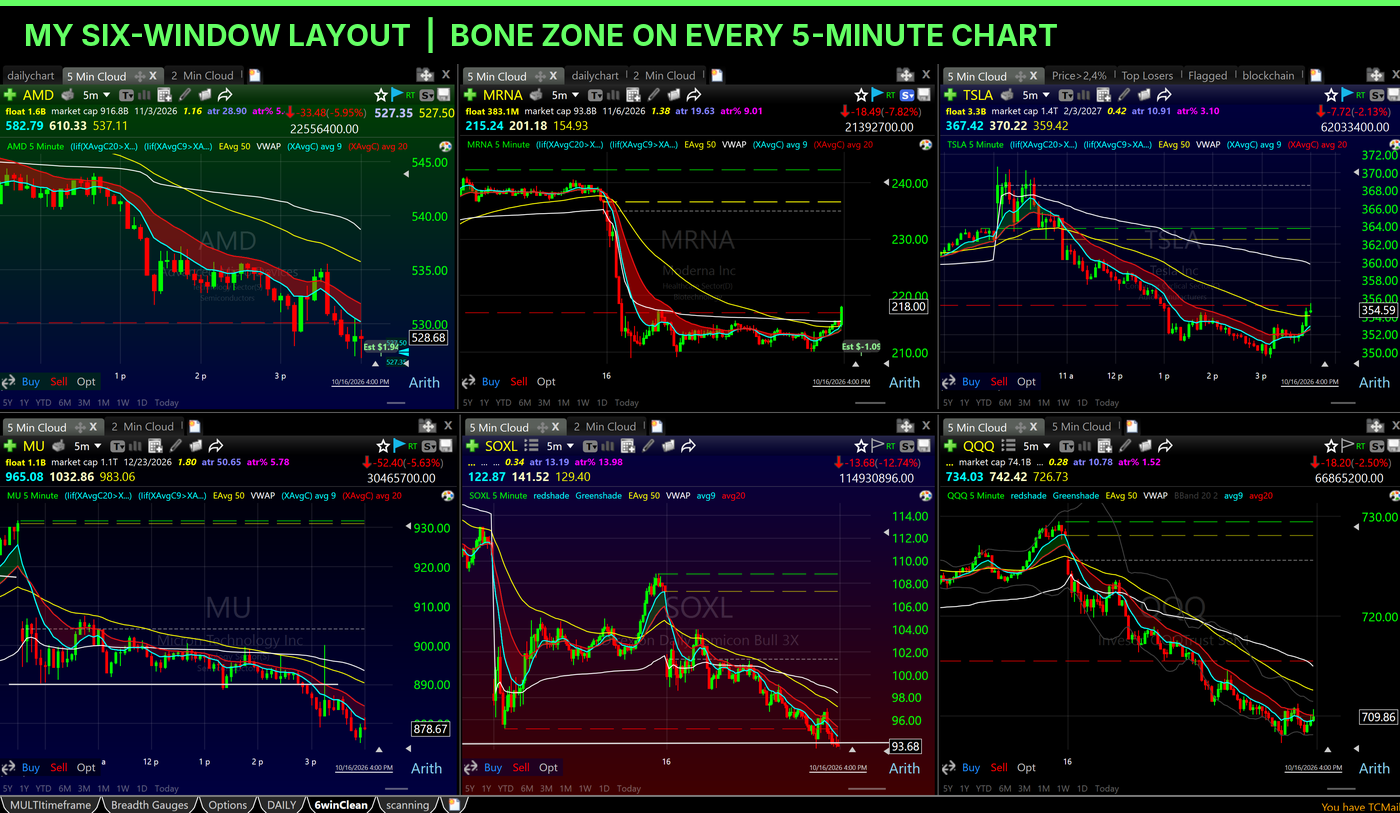
3. The six-window layout. My top six names, each on its own 5-minute chart with the Bone Zone shaded, the 50 EMA and VWAP. Every chart carries my custom toolbar: float, market cap, next earnings date, ATR and ATR percent. This is the screen I live on after the open.
4. Options. Daily and hourly charts of the stock, a chart of the option contract itself directly underneath, the full options chain with delta, vega, theta and gamma, and my options swing watchlist. I haven't found another charting platform that puts the stock, the option contract's chart, the chain with the Greeks and my watchlists in one layout I control.
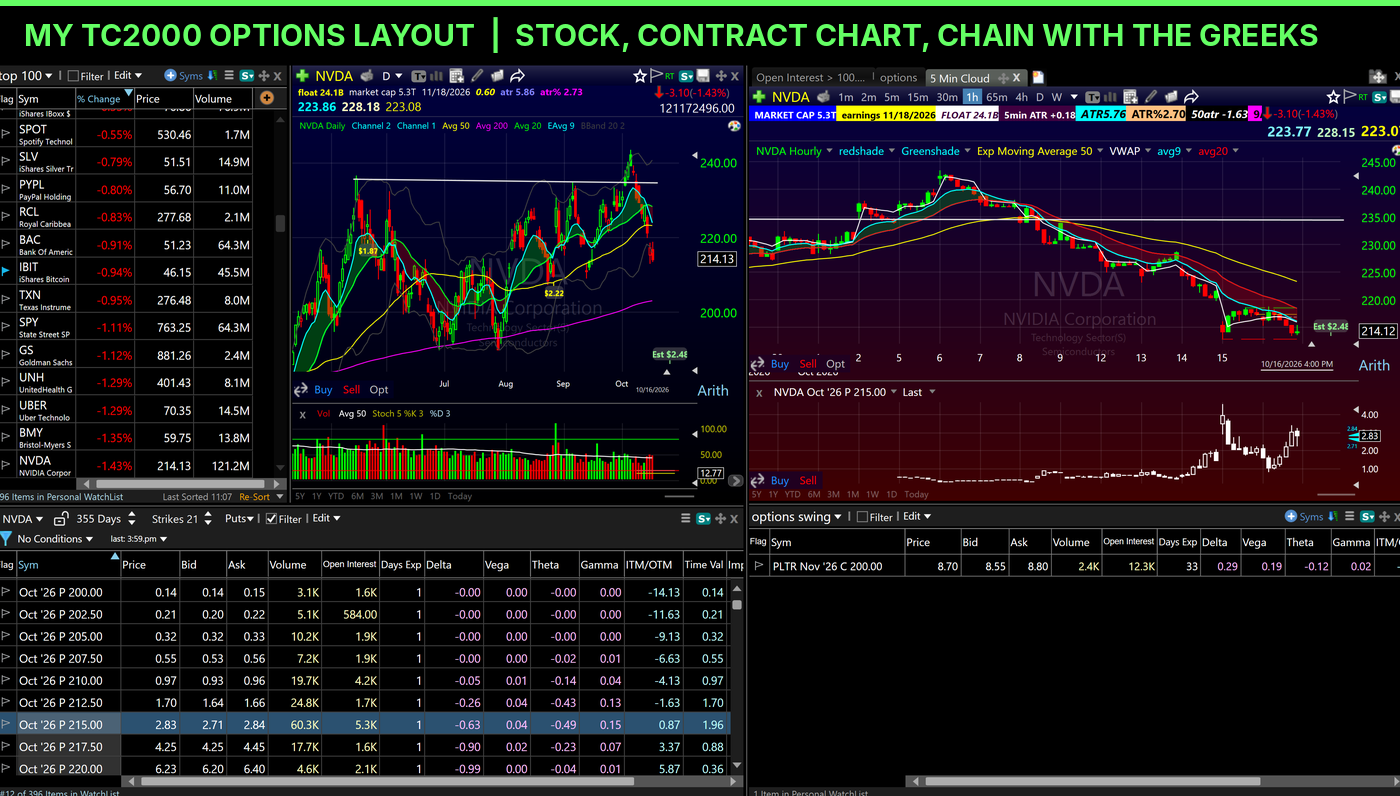
That options layout is how I make the shares-versus-puts call I wrote about in my parabolic short playbook.
And here is the part most traders never find. You can detach any layout from the desktop app and throw it onto another monitor. Run as many as your machine can handle.
The Bone Zone is built for TC2000
The shaded cloud on every chart above is the Bone Zone. It is the 9 and 20 EMA zone, and it is my indicator for the first pullback setup. TC2000 shades it green when it holds and red when it fails, so a new trader can read a fast tape without squinting at two thin lines. If you want my exact setup, I give away my whole TC2000 layout, Bone Zone included.
What TC2000 costs
TC2000 sells three plans: Basic at $24.99 a month, Premium at $49.99 and Premium+ at $99.99. Real-time options data is a $9.99 add-on.
Tell you exactly what I tell every student: start on Premium. You get EasyScan, multi-monitor support and the full charting package. I run Premium+ because I want the live market breadth gauges and the bigger alert count. I'm a full-time day trader; you probably don't need it yet. Through my TC2000 link you get a $40 coupon toward your first month.
Where TC2000 falls short
- The Mac. The TC2000 desktop platform is a Windows program. On a Mac you use the web version, and the newest updates made it very good: it opens in your browser and it is the desktop platform. It is still not as good as the desktop.
- The learning curve. All that customization means a blank TC2000 can look intimidating. Grab my layout and skip that week.
- It is stocks and options. If you want futures or crypto, look elsewhere.
My full deep dive lives in my TC2000 review.
2. Deepvue: Best for Learning How the Great Traders Scan
I paid for Deepvue for over a year. I really liked it. Visually it is amazing, and the way they lay things out is clean and fast. So why did I cancel? I spend my whole day in TC2000, and I already have the scans from the traders I have studied my whole adult life. For me it was redundant. For a newer trader, it might be the best shortcut on this list.
Famous-trader scans built in
Deepvue partnered with well-known traders and loaded their screens as presets. Pradeep Bonde (Stockbee) is in there with his 4% breakout scans, along with folders from Mark Minervini, Mike Webster, Dan Zanger, Qullamaggie and more. Click one, run it, then duplicate it and make it your own. It took me years of reading and copying to build those scans by hand. Deepvue hands them to you on day one.
Model books, a community and now a journal
Model books are Deepvue's playbook feature. One click sends a chart into your book, you tag it, and it comes with preset books for setups like high tight flags, wedge pops and flat bases. There is a community tab where traders share screens, watchlists, indicators, dashboards and AI prompts.
And this week they launched a journal. It connects to your broker, syncs your trades, tracks win rate, profit factor and your equity curve, and shows your open risk at every stop as a percent of equity. That risk panel is the 1% Rule turned into a dashboard. Full disclosure: these features launched after I cancelled, so I have not put them through my own trading yet. I'm describing what Deepvue announced, not what I tested.
The honest catch for day traders
Look at those model book presets: high tight flags, wedge pops, flat bases. Those are swing and growth setups. Deepvue's own site says the platform is built for swing and position timeframes. Use it to find the names and study the leaders. Do your intraday work somewhere built for it.
What Deepvue costs
About $49 a month, or roughly $41 a month billed annually, with a 30-day free trial and a free practice account on delayed data.
3. TradingView: Best for Mobile and Multi-Market Traders
I still pay for TradingView. It has a great mobile app, I check crypto quotes on it, and it covers every market under one roof: stocks, futures, crypto, forex. If you trade more than US stocks, that alone might move it up your list.
Where it falls short for a stock day trader
You can add more charts to the screen, but that's about it. You don't get TC2000's depth of layout control. In fairness, TradingView has added options chains and option-contract charts through supported brokers, and it has a news feed. What it can't do is let me build one layout with the stock, the contract, the chain, third-party news and my scans exactly where I want them.
The scanning is where it really breaks down for me. Open the screener and it takes over the screen. The chart gets squeezed into a corner. It's not visually appealing and it's not efficient. Compare that to my TC2000 scanning layout above, where six live scans sit under the chart I'm actually trading.

What TradingView costs
TradingView has a free Basic plan with ads and limits. Paid plans run $14.95 (Essential), $34.95 (Plus) and $69.95 (Premium) a month, less on annual billing, after an April 2026 price increase. Real-time US exchange data costs extra, so compare the all-in number, not the headline.
My head-to-head on these two is here: TC2000 vs TradingView.
Platforms I Didn't Rank
TrendSpider is a real charting platform with automated trendlines and backtesting. I haven't run my trading day on it, so it doesn't get a rank from me. I don't rank tools I haven't lived in.
Finviz deserves a mention for one reason: it was the first screener I saw that put a heat map and filters for the whole market on one page. I ran it every morning for years after my TC2000 scans. It is a screener with charts, not a charting platform.
Trading Platforms Are Not Charting Platforms
These two show up on every charting list. They deserve a real look, because one of them is how I actually make money every day.
DAS Trader Pro: The Trigger, Not the Chart
There's nothing I can do on DAS Trader that TC2000 couldn't show me better. DAS is the software I use to make trades. That's its job, and it is the best at it.
DAS is not a broker. You get it through a broker that offers it. I run DAS Trader on SageTrader Pro. Other routes include Interactive Brokers (it has to be an IBKR Pro account, not Lite), Lightspeed, Cobra Trading and CenterPoint Securities. SageTrader also has a free web and mobile platform with zero commissions on US stocks (regulatory fees still apply), and it's pretty good. I use the Pro side because the cost is negligible next to the tools I get. On SageTrader Pro the DAS platform is $99.99 a month. Add the data feeds and you end up around $160 a month, give or take. Both are on my SageTrader page. Your broker sets the pricing, and some brokers waive the platform fee if you trade enough volume, so check the rules before you sign up.
Here's why I trade through it:
- It is light. DAS is an old program, so it is stable and it barely touches your computer. On my machine it runs under 100 megabytes of RAM. In today's world that is incredible. I run a lot of windows, layouts and montages, and orders still go out fast.
- Everything is customizable. You can script a hotkey for almost anything.
- It trades the premarket. My charting platform isn't my broker, so the premarket order goes through DAS.
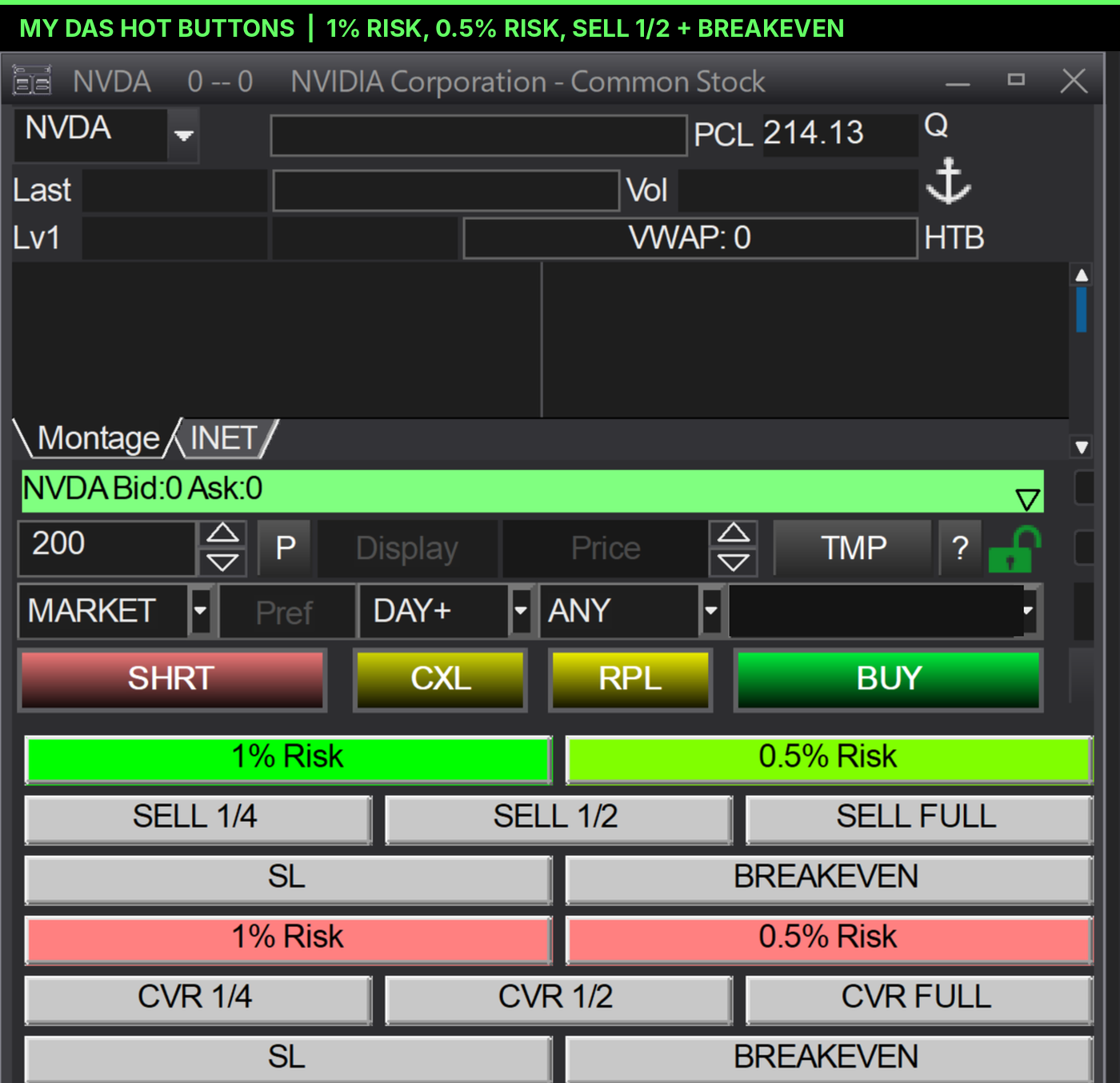
Now the part every DAS review gets backwards. I don't believe in hotkeys. I don't want to look down at a keyboard to find a button. I want my eyes on my charts. I believe in hot buttons. In DAS you can take a hotkey script and turn it into a button on the montage. That is the real reason I use DAS.
Look at my buttons:
- 1% Risk and 0.5% Risk, green for longs and red for shorts. That is my 1% Rule, which I learned from my mentor Paul Singh, built into the order entry. The 0.5% button is for choppy markets like this one.
- SELL 1/2 and BREAKEVEN. Sell half at the target, move the stop to my entry. That is my Free Trade in two clicks.
- SELL 1/4, SELL FULL and SL for longs. CVR 1/4, 1/2 and FULL for shorts.
And here are the charts. Those are DAS's own charts next to the montages: old-looking and blocky. Now look at the same stock, same day, same five minutes in TC2000.
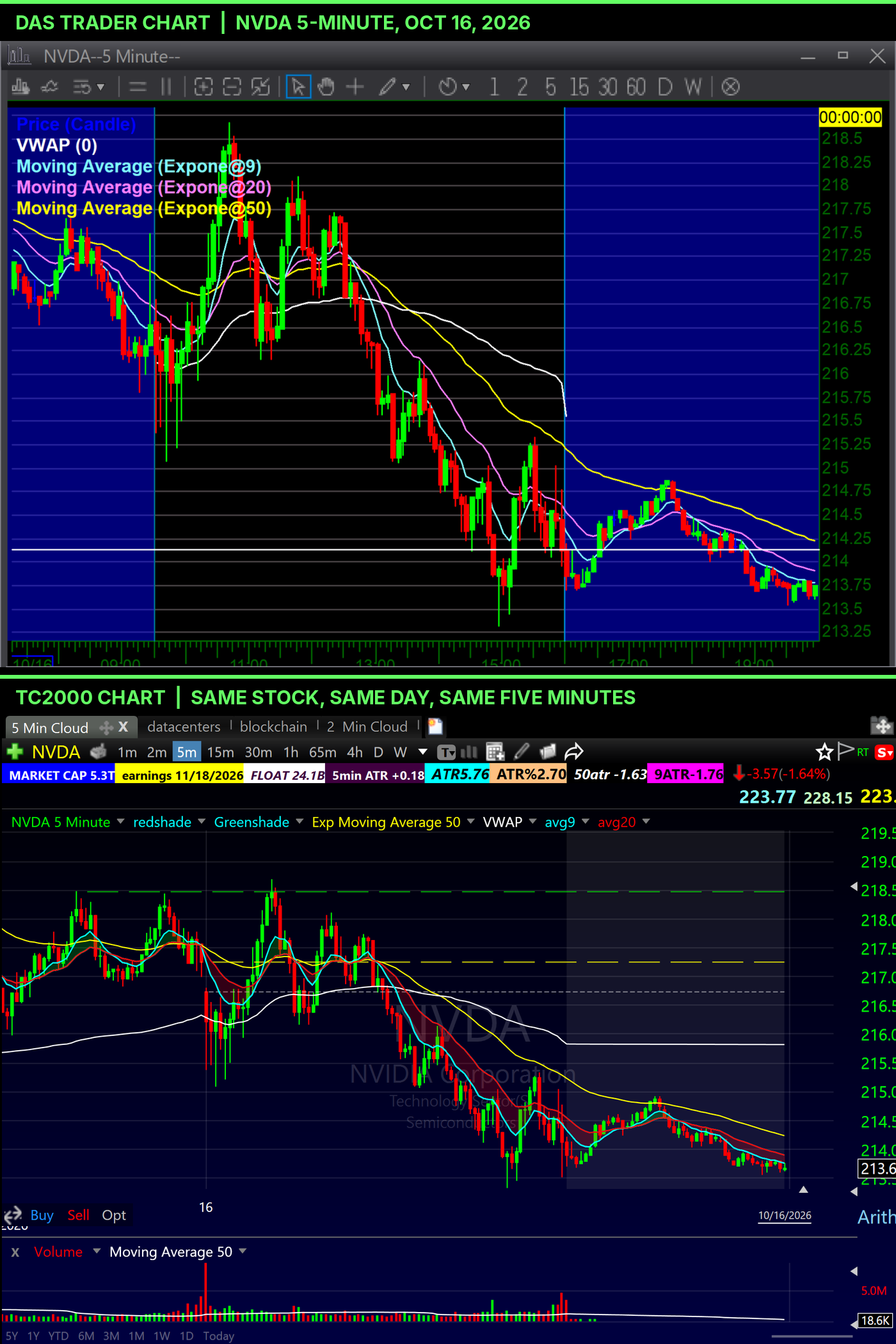
That picture is why I run two platforms.
One more thing for Mac traders. DAS is a Windows program. If your trading machine is a Mac, plan around that before you pick a broker.
thinkorswim: Good Charts, Locked to One Broker
I want to be fair here, because thinkorswim's charts are good. Schwab gives the platform to every Schwab client at no charge, and it is loaded: thinkScript for custom indicators and scans, paperMoney for simulated trading, deep options tools.
Here's the catch. It is a broker's workstation. The charts are free because the platform exists to route your orders to Schwab. Leave Schwab and your layouts, scripts and scans stay behind. TC2000 doesn't care which broker you use.
It's also heavy. I've used it on and off for a long time, and sometimes even I struggle to find the setting I need. I don't need a platform that lets me watch TV or play Tetris. Give me something fast and focused on trading.
Where it fits in my setup today: it is my legacy swing account at Schwab. It is not where I day trade.
If you're choosing between the two, here's my full breakdown: TC2000 vs thinkorswim.
What Free Actually Gets You
If you are not ready to pay yet, here is the honest version:
- TradingView Basic is free, with ads and limits on indicators and charts.
- thinkorswim costs nothing if you have a Schwab account, including paperMoney.
- SageTrader's standard web and mobile platform is free, with zero commissions on US stocks.
- Deepvue has a free practice account on delayed data, plus a 30-day trial.
- Finviz is free and still a great morning screener.
Watch the data. Free plans often run on delayed quotes, and the SEC's own glossary is clear on the difference between real-time quotes and delayed ones. Delayed data is fine for learning to read charts and for swing planning at night. It is useless for day trading.
My rule: free tools are for learning the platform. The day you trade real money intraday, pay for real-time data. A professional setup costs less than most people's phone bill.
What These Platforms Actually Cost
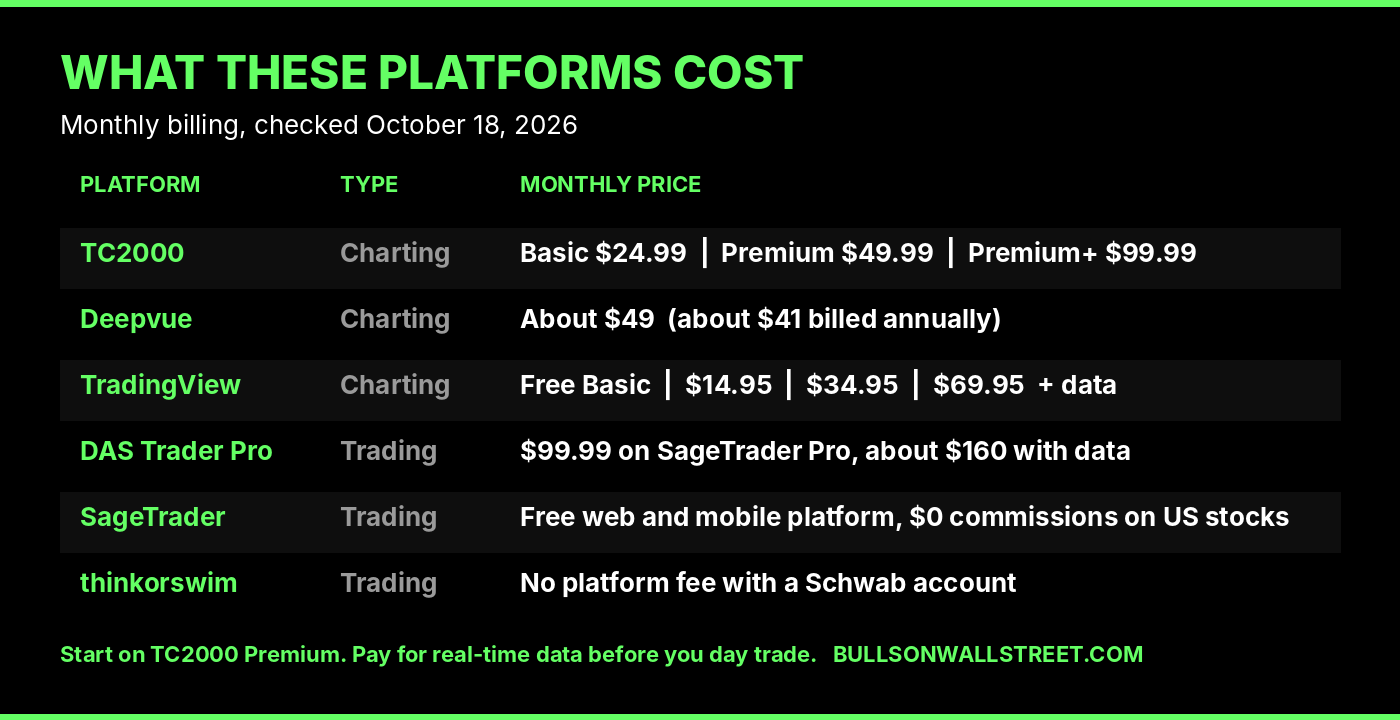
Prices checked October 18, 2026, monthly billing:
- TC2000: Basic $24.99, Premium $49.99, Premium+ $99.99. Real-time options data +$9.99. $40 coupon through my TC2000 link.
- Deepvue: about $49, or about $41 billed annually. 30-day free trial.
- TradingView: free Basic; Essential $14.95, Plus $34.95, Premium $69.95. Real-time exchange data extra.
- DAS Trader Pro: $99.99 for the platform on SageTrader Pro, about $160 a month once you add data feeds. Pricing is set by your broker. SageTrader's standard web and mobile platform is free, with zero commissions on US stocks.
- thinkorswim: no platform fee with a Schwab account.
At the level a serious day trader actually needs, the three charting platforms land close to each other, roughly $50 to $70 a month once you count data. The full-time setup costs more. I pay $99.99 for Premium+, and I would not recommend that to a beginner.
For the rest of my stack, the news feed, the journal and the hardware, see my full list of stock trading tools and my desk setup.
Pick Your Platform in Two Minutes
- New to day trading, US stocks: TC2000 Premium plus SageTrader's free platform. Move up to DAS when you need the better tools.
- Swing or growth trader who wants proven scans handed to you: Deepvue.
- You trade futures or crypto too, or you live on your phone: TradingView.
- You already bank at Schwab and mostly swing trade: thinkorswim is free, use it.
- Full-time day trader: TC2000 for charts, DAS for execution, and nothing else on your main screens.
Whatever you pick, build it with intention. Research on Robinhood users found that the stocks drawing the most attention, and the most buying, went on to underperform. Your platform decides what grabs your attention. Choose the one where your own scans and your own setups get the front row.
If you want to see how I turn these scans into a watchlist, start with how I scan for explosive stocks.
FAQ
What is the best charting software for day trading?
TC2000 is the best charting software for day trading US stocks in my experience. Its modular layouts, fast scanning, options charts and built-in news keep the whole trading day in one platform. I have used it since 2007.
Is DAS Trader a charting platform?
No. DAS Trader Pro is a direct-access trading platform you get through a broker. It has basic charts, but its job is fast order entry, Level 2 and position management. Pair it with a real charting platform.
Is thinkorswim good for charting?
Yes, the charts are good, and they are free with a Schwab account. The catch is that thinkorswim is locked to Schwab. Your layouts and scans don't follow you if you change brokers.
Is TradingView good for day trading?
TradingView is excellent for mobile, crypto, futures and multi-market charting. For a US stock day trader, its scanner layout is weak: the screener takes over the screen and squeezes the chart.
Is Deepvue good for day trading?
Deepvue is built mainly for swing and growth traders. It is great for finding leading stocks and learning famous traders' scans. I would not use it as my intraday chart.
How much does TC2000 cost?
Basic is $24.99 a month, Premium $49.99 and Premium+ $99.99. Real-time options data is a $9.99 add-on. Most traders only need Premium.
Which TC2000 plan do you use?
Premium+, for the live market breadth gauges and the higher alert count. I tell every student to start on Premium.
Does TC2000 work on a Mac?
The desktop platform is built for Windows. On a Mac, use the web version. The newest updates made it very good, though it is still not as good as the desktop.
What is the difference between a charting platform and a trading platform?
A charting platform finds and plans the trade: charts, scans, watchlists. A trading platform executes it: order entry, routing, position management. Most pros use one of each.
Do I need Level 2 to day trade?
Level 2 lives in your trading platform, not your charting platform. DAS gives you real Level 2 depth. Learn to read the chart first; Level 2 is a fine-tuning tool, not a setup.
Can I day trade with free charting software?
You can learn on free software. You can't day trade well on delayed data. Once real money is moving intraday, pay for real-time data.
Are hotkeys necessary for day trading?
Not for me. I use hot buttons, hotkey scripts turned into on-screen buttons, so my eyes never leave the chart. DAS lets you build them.
What charts does Kunal Desai use?
TC2000 for charting and scanning, with the Bone Zone shaded on every chart. I execute through DAS Trader on SageTrader Pro.
Learn the Whole Process, Not Just the Software
About the Author
Kunal Desai is the CEO and founder of Bulls on Wall Street. A professional trader since 2007, he has navigated every major market cycle -- from the 2008 financial crisis to today's high-volatility environments. Having mentored 7,000+ students through his live trading bootcamps, Kunal trades live every morning in the Bulls on Wall Street Trading Chatroom, where a full-access 7-day trial costs $7. He is dedicated to teaching real-world execution and high-probability strategies. Based in Miramar Beach, Florida.
Connect with Kunal: Read his full story | Instagram | YouTube