

By Kunal Desai · Updated August 11, 2026
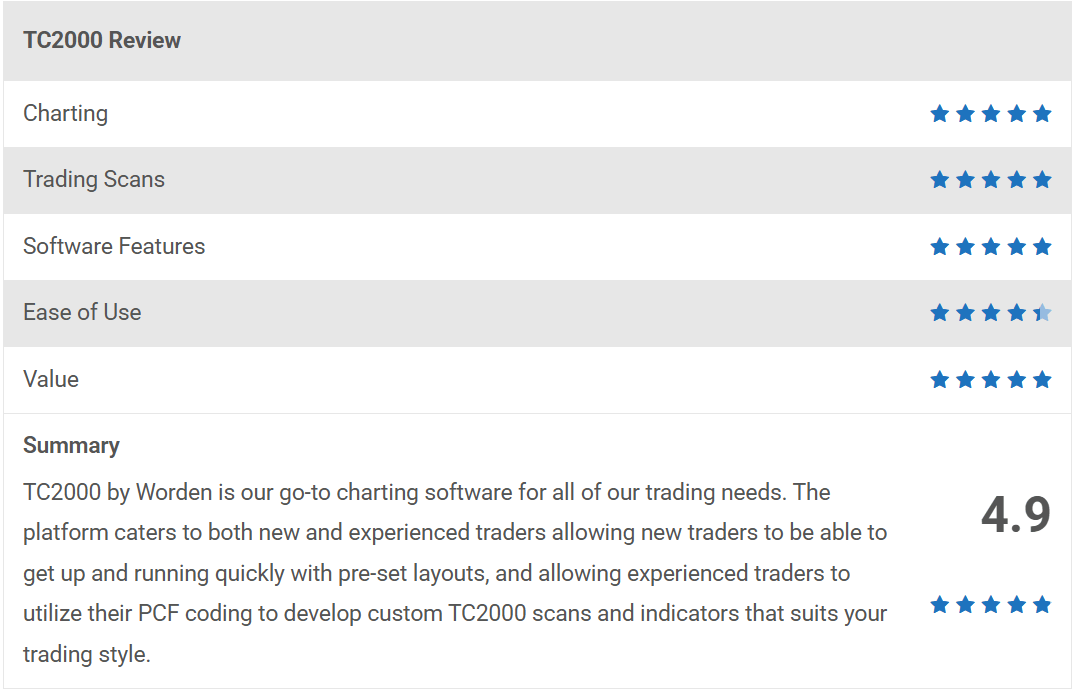
TC2000 is the charting and scanning platform I have run every single trading day since 2007. My rating: 4.95 out of 5. This is the honest version, including the one year I left, what still annoys me, and exactly who should not buy it.
Quick facts before we start:
- Who is reviewing: I started trading in 1999, went full time at the end of 2007, founded Bulls on Wall Street in 2008, and have taught 7,000+ students. TC2000 has been on my screen for all of it.
- What TC2000 is: a Windows-based charting, scanning and trading platform for US stocks and options, built by Worden. The current release is Version 25.
- What it costs: Basic $24.99/month, Premium $49.99/month, Premium+ $99.99/month. Real-time US stock data from Nasdaq Basic is included in every plan. The BOWS referral link takes $40 off your first month, so Premium starts under $10.
- What it does not do: futures, cryptocurrency coins, a native Mac app, or a native iPhone app. I cover every one of those below.
Download it free and follow along while you read. No card, no signup, delayed data:
How I Use TC2000 Every Single Day
TC2000 is literally the first thing I open in the morning and the last thing I close at night.
The night before, I run my scans to build the next day's watchlist. Earnings, news catalysts, strong technical setups. TC2000 lets me flip through charts with the spacebar, and I can go through 1,000 charts in 20 to 30 minutes. That speed is something no other platform has matched for me in 19 years of trying them.
By 9 AM my pre-market scans are running to catch overnight gaps and news movers. By 9:30 when the bell rings, I already know exactly what I am watching and where my levels are. During the day it runs everything: my VWAP setups, my first pullback entries, my opening range breakouts. Every chart screenshot on this blog is pulled straight from TC2000. When I screen share with bootcamp students, they are looking at my TC2000 layout.
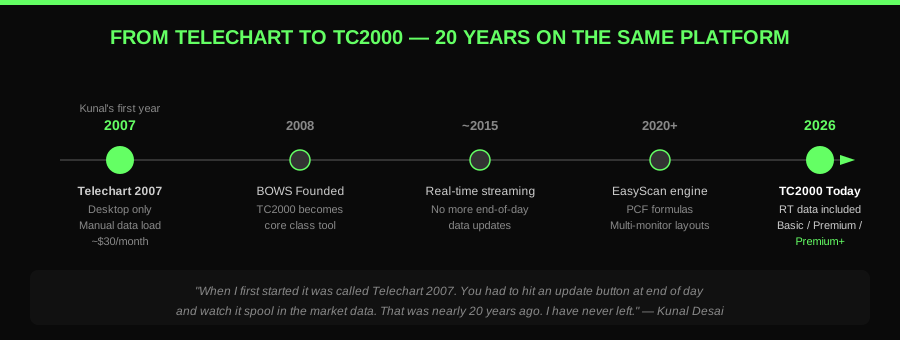
From Telechart 2007 to TC2000 Premium+, the same platform since 2007
The Year I Left TC2000
Every reviewer claims loyalty. I will tell you about the time I actually walked.
In 2017 and 2018 I was trading a lot of cryptocurrency, and TC2000 does not chart coins. So I had to use TradingView. And credit where it is due: TradingView had one of the best marketing programs I have ever seen. One year nobody was using it, then crypto got hot, TradingView became the new hot platform, and it snowballed. Millions of users now. Go on YouTube today and almost everybody making videos in the futures or crypto space is on TradingView.
Here is what I actually found living inside it. Most people just use the TradingView web app. The desktop app is heavy and it basically looks like the web app anyway, there is not really any difference. And the layout is where it fell apart for me. The watchlist is always in the same spot, bolted to the right side. You cannot make it modular and move it around. If you need your scans or your options data, they are not sitting on your layout. You have to hit a button and toggle them open. You cannot fit everything on one square page.
When crypto cooled off, I went straight back. Not out of habit. Because the layout problem never got fixed. I write up the full head to head in my TC2000 vs TradingView comparison if you want every detail.
The Layout Is the Product
This is the real reason I have never left, and it is the thing generic reviews never explain properly.
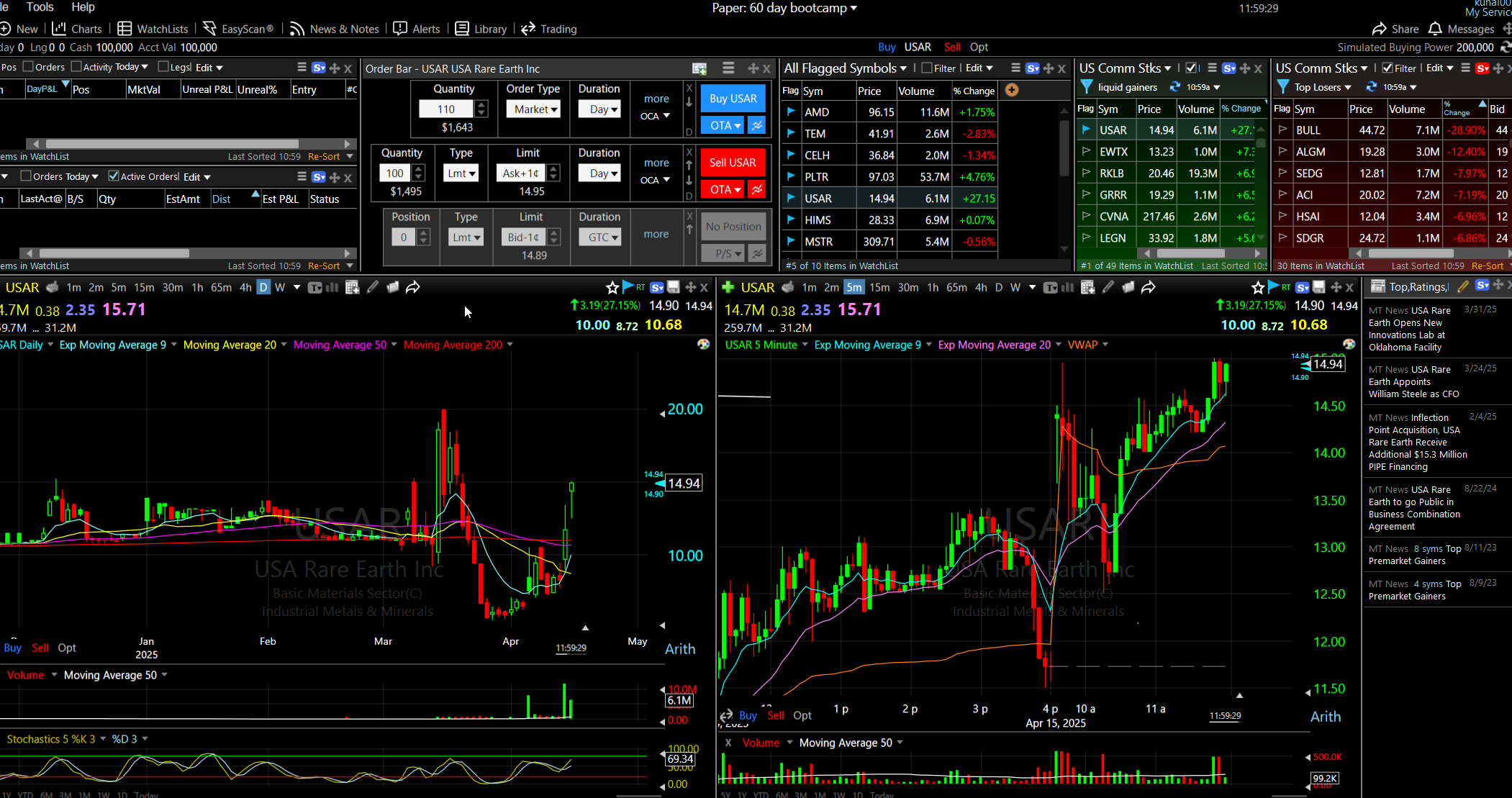
Look at my scanning layout. Daily chart on the left. Intraday chart on the right. My watchlists and a handful of scans across the bottom. Everything on one screen, and every single one of those boxes is modular. I can grab any of them and move it wherever I need it. Even during the trading day, I can open another chart and literally park it into the layout, or swap a scan out for a chart when the tape demands it.
I do a lot of summers in Europe, which means more time on a laptop. So I pop a module out of my layout and reshape the whole thing for the smaller screen in about a minute. That kind of flexibility sounds small until you have lived without it.
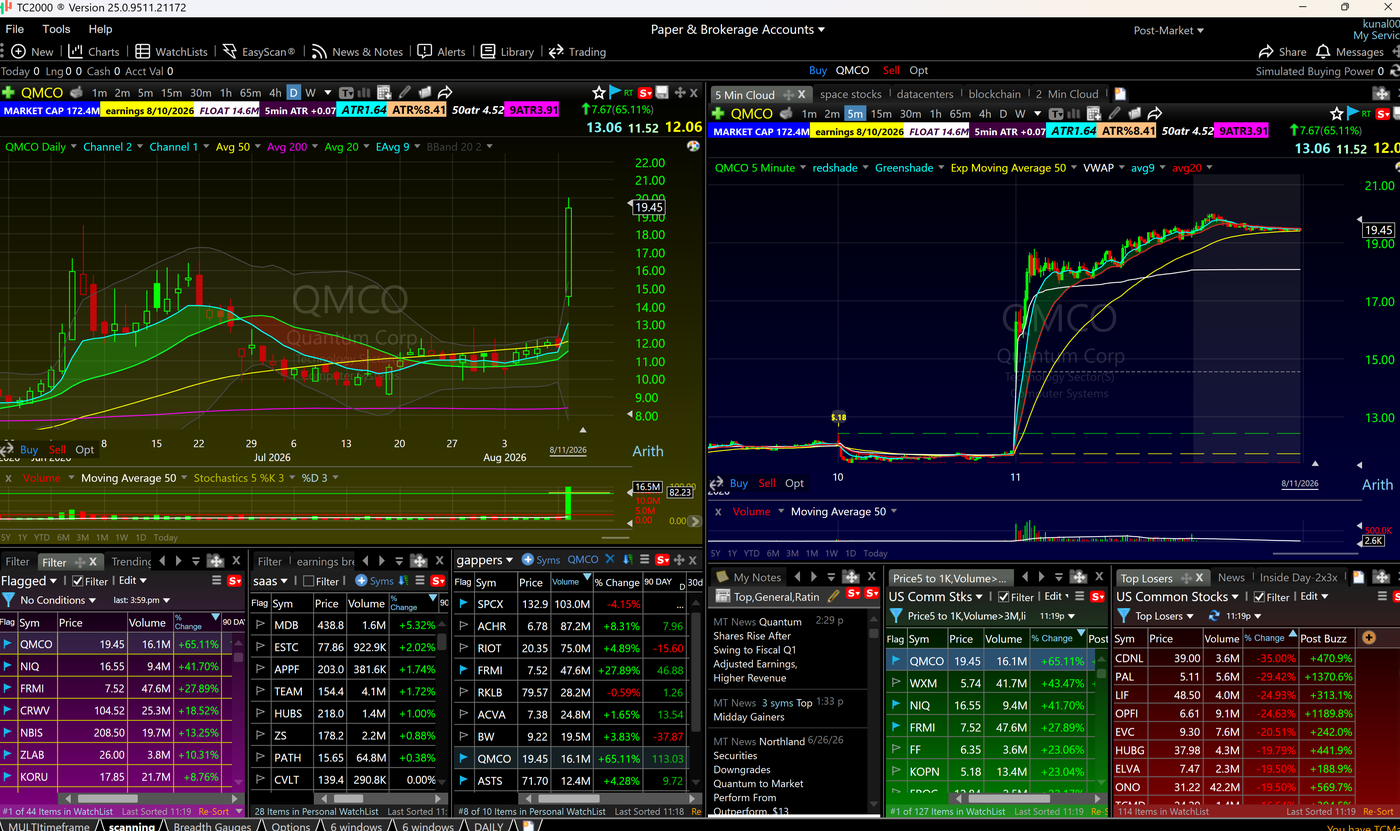
Here is the actual layout I use, scans included, and I wrote a full breakdown of the exact TC2000 layout I have traded from for 20 years, window by window, if you want to rebuild it yourself.
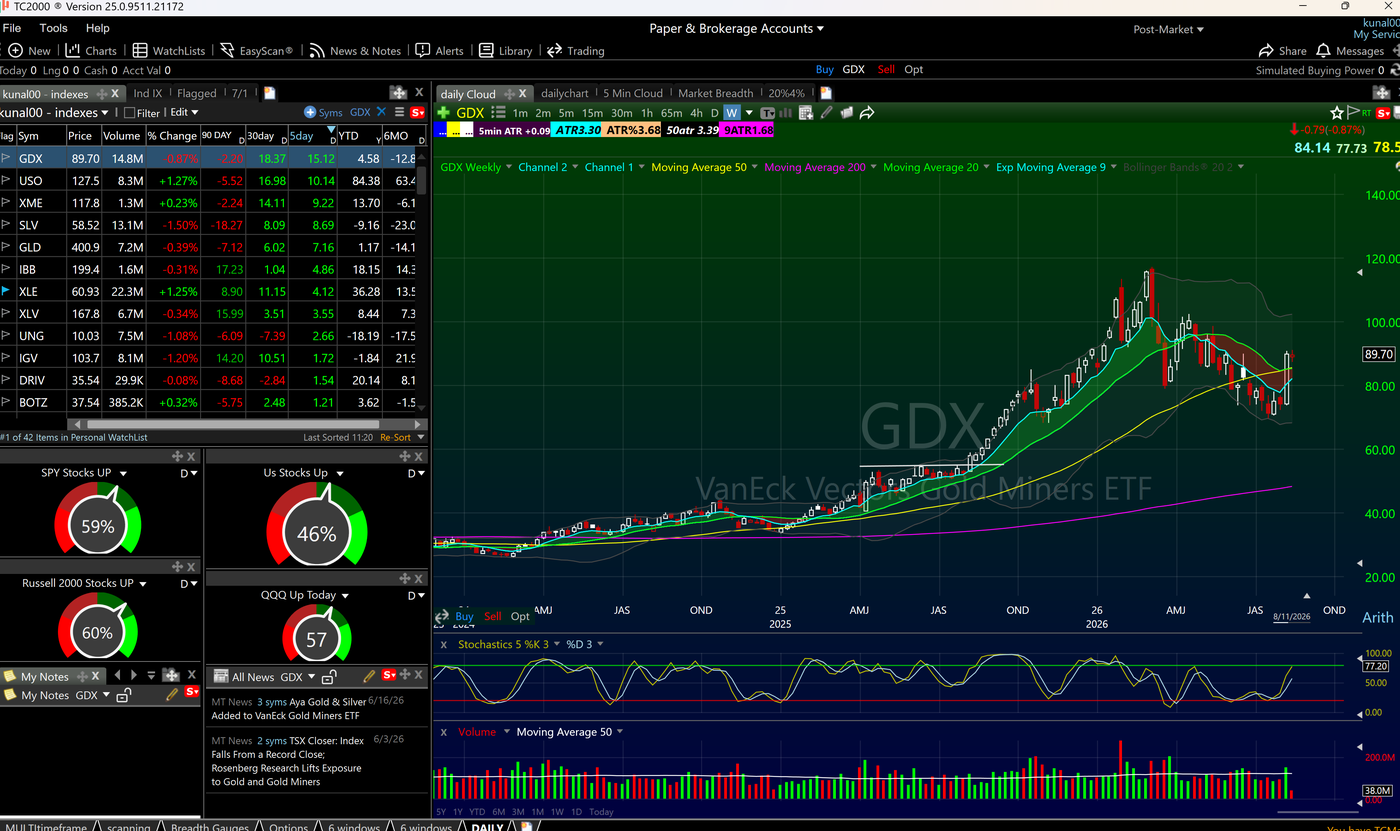
And it is not one layout. You build multiple layouts and drag them across your different monitors. Here is a completely different one I run when I am scanning the indexes and reading market breadth. Index watchlist, GDX weekly, news, my notes, and live breadth gauges telling me what percentage of SPY, the Russell 2000 and the QQQ are green right now.
The ATR Setup No Generic Review Will Show You
Beyond moving boxes around, you can add your own personal flavor, and this is where TC2000 separates from everything else I have used.
If you are a momentum trader running trends or parabolic shorts, you live and die by ATR. Most platforms make you display ATR as an oscillator indicator on the bottom of the chart, and it just eats screen space. I do not want a wiggly line. I want the number, labeled, where I can read it in one glance.
So on my TC2000 charts, ATR is displayed as a labeled value in dollar terms and in percentage terms. Then I wrote scripts so the chart also shows me the ATR distance from the 50 SMA and the ATR distance from the 90 moving average, and frankly I could point those at any EMA I want. It is all customizable, and that is the real key to TC2000. You can see every one of those labels in the layout screenshots above, live on a stock that moved 65 percent that day.
Those two numbers are not decoration. They power my ATR Extension Rule: 7 or more ATRs above the 50 day means no swing trades on that name, day trade it only, and 3 or more ATRs above the 90 day flags a mean reversion candidate you never hold. The full rule lives in the layout post, and how it fits into position sizing lives in my risk management system.
One more thing traders underrate: color. You are staring at this screen all day. You need bright colors and clearly differentiated charts so that in real time you can spot something in a hot second. TC2000 lets you make the charts pop, and mine do.
Scanning and Watchlists
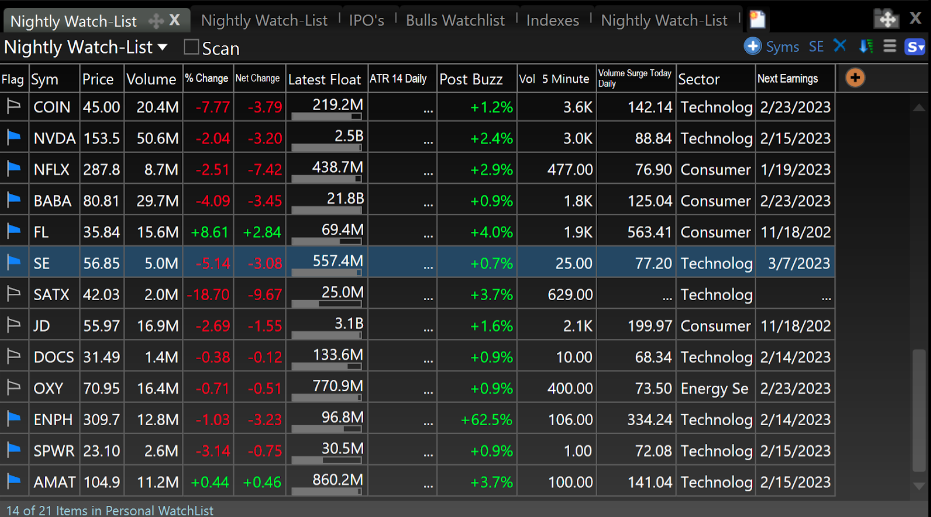
EasyScan is the engine of the whole platform. You get a pre-built library of well over 100 scans, plus the PCF formula language to build nearly any condition you can think of. At Bulls on Wall Street we run over 10 active scans feeding the 18 strategies we trade. The job of a scan is to cut thousands of stocks down to the few that actually fit your plan, and nothing I have used does it faster. My exact process is in the explosive stocks scanning guide, and the scans themselves ship inside my shared layout.
Watchlists are more than lists here. You can run conditional columns, filters and sorting on any watchlist, so the list itself tells you which names are meeting your trading rules right now instead of you checking each one.
Alerts
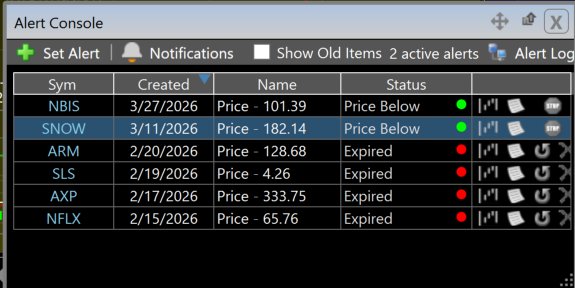
I set alerts on hundreds of stocks in a bull market. You only have so much mental bandwidth to actively watch, I can realistically monitor about 12 stocks at a time. But in a hot market there are dozens that could trigger at any moment, so I set trend line alerts, moving average alerts, and price level alerts. Lots of them. TC2000 handles all of it without slowing down, even in the most volatile conditions.
The Simulator
TC2000 has one of the best trading simulators on the market, with unlimited paper trading even on the free tier. Every student in our 60-Day Trading Bootcamp goes on the simulator in month 2, running the exact same layout they will use when they go live. Same charts, same scans, same buttons. The transition to real money should change your emotions, not your workflow.
The Crypto Objection Is Dead
For years, the one legitimate reason to leave TC2000 was cryptocurrency. It cost me a year of my own workflow in 2017 and 2018. That objection is gone, and here is why.
The major coins all trade as ETFs now. Spot Bitcoin and Ethereum ETFs have been live since 2024. Solana and XRP got their US spot ETFs in late 2025, with Litecoin, Hedera and even Dogecoin products in the same wave and filings stacked up behind them. Every one of those is a stock ticker, which means every one of them charts, scans and alerts inside TC2000 like anything else on my watchlist.
And let me be honest about the asset class itself. I was a huge proponent of cryptocurrency. I told everyone to take a gander at it at some point. But the coin market has been dead for years now. You do not need coin charts to trade this theme in 2026. If you want to keep an eye on crypto, watch the ETFs. TC2000 has them. You can see GLD, SLV and the rest of my macro watchlist in the breadth layout above, crypto ETFs slot into that list the same way.
The Honest Cons, 2026 Edition
After 19 years of paying this company every month, here is what still bugs me.
No futures. TC2000 is built for US stocks and options, period. If futures are your market, this is not your platform.
No native Mac app. Let me be very clear about what Mac users actually get, because most reviews fudge this: there is no Mac desktop application. What you are doing on a Mac is running the complete Windows version of TC2000 streamed live in your browser. I am using it in the browser on my MacBook Air right now and it is working pretty good. But a browser is never going to be as good as a desktop app, and I am not going to pretend otherwise.
No native iPhone app yet. In 2026. Android traders get a real native app from the Play Store with real-time watchlists, charts and scans. iPhone traders get TC2000 Mobile, which is browser access to the full software on your phone. It works, and your layouts and scans follow you, but Worden has had iPhone listed as coming soon for a long time and it is fair to be annoyed about it. My own workaround tells you everything: I keep a small Webull account purely for its iPhone app. I do not trade there. The account exists so I can pull up quotes and charts on my phone in seconds, because Webull's iPhone app is excellent. When a competitor's free app is covering a job Worden should own, that is a real gap.
Options analytics are thin. You can chart options and see chains, but if you need Greeks and probability curves you will want a dedicated options platform alongside it.
Who Should NOT Buy TC2000
Futures traders. The platform is geared toward the stock market, and the entire futures ecosystem lives on TradingView. Use the tool your market uses.
Full-time cryptocurrency traders who need altcoins and meme coins. The ETF workaround covers the majors, but if your business is trading small coins, you need coin charts and TC2000 does not have them.
Anyone who requires a native desktop application on a Mac. The browser stream is genuinely usable, I run it that way myself when I travel, but if that compromise is a dealbreaker for you, respect it and pick something else.
Serious options-first traders who model with Greeks and probability analysis. Keep TC2000 for the charts and scans if you like, but you will need a second platform for the options math.
Who It Is Built For
Day traders and swing traders in US stocks who need fast scanning, clean charts, and the ability to rip through hundreds of names quickly. If you trade momentum stocks with catalysts, earnings and news, which is exactly what we teach at Bulls on Wall Street, TC2000 is built for you.
It is also genuinely great for beginners. The interface is clean, and every student in our 60-Day Bootcamp gets set up on TC2000 in the first week. Most are comfortable within a day.
TC2000 Pricing in 2026
Three plans: Basic at $24.99/month, Premium at $49.99/month, Premium+ at $99.99/month. Real-time US stock data from Nasdaq Basic is now included in every plan, it used to be a paid add-on, so ignore any older pricing guide listing data as extra. Annual billing saves 17 percent and biennial saves 25 percent. Start monthly, switch to annual once TC2000 is locked into your routine. And the BOWS $40 discount puts Premium under $10 for your first month.
Basic is charts, real-time data and paper trading. Fine if you are just looking up stocks and doing research at night. Too limited for active trading.
Premium is the sweet spot and what the majority of BOWS students run. It covers everything the BOWS trading system requires: real-time EasyScan, custom PCF conditions, all the drawing tools, multiple layouts, and up to 100 active alerts. We have watched traders drop expensive standalone scanning software and replace it with this tier alone.
Premium+ is what I personally run. The extra cost is negligible once trading is your full-time job, and it adds the tools you cannot build on Premium: real-time Market-Pulse gauges that show how many stocks in your list are meeting your conditions right now, Market-Pulse indicators for plotting breadth historically so you can build your own market timing overlays, intraday performance columns for post-trade review, 1,000 tracked alerts, and a $300 per year discount if you keep a TC2000 Brokerage account with $30,000 or trade once a month. Those gauges are not theoretical, they are the breadth dials running live in my index layout screenshot earlier in this review.
Full plan-by-plan math, including the effective annual and biennial rates, is in my TC2000 pricing guide.
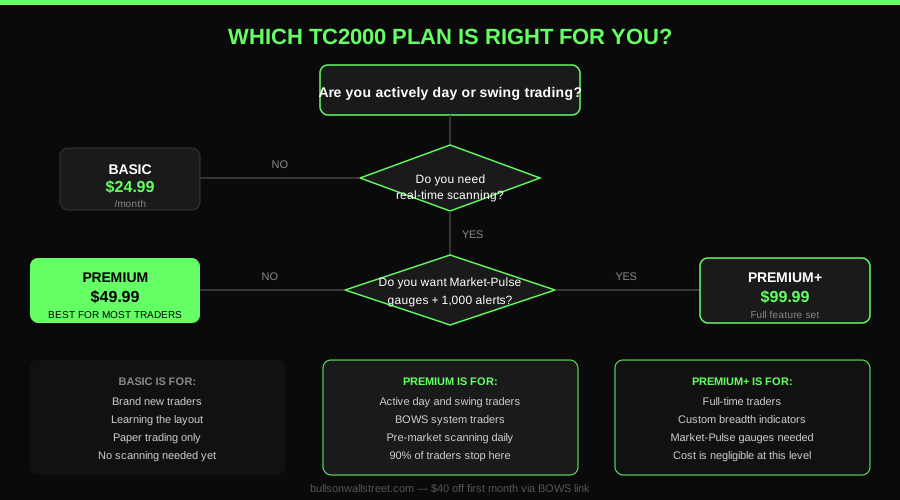
Which TC2000 plan is right for you, a simple decision framework
Brokerage, Support and Platforms
TC2000 runs its brokerage through Interactive Brokers as the clearing firm, with 4:1 intraday margin, 2:1 overnight, and a $4.95 flat fee per stock trade. You can trade straight from the charts. I personally keep my execution at Etrade and Thinkorswim out of two decades of habit and use TC2000 strictly for charting and scanning, but the integrated brokerage is legitimate, and details are in their commissions breakdown.
Support is a strength: live chat weekdays 9 to 5 EST plus Saturday hours, a deep tutorial video library, a help site, and direct customer service.
Platforms in one line each: Windows gets the installed desktop app. Mac gets the full Windows version streamed in the browser. Android gets a native app. iPhone gets TC2000 Mobile in the browser, with the native app still pending.
FAQ
Is TC2000 worth it? Yes. At $49.99 per month for Premium, it replaces multiple software subscriptions, and the scanning alone saves me hours every week. I have paid for it every month since 2007 and have never considered canceling.
Is TC2000 good for beginners? Absolutely. The interface is cleaner and more intuitive than most platforms. Bootcamp students who have never touched charting software are comfortable within their first week. Start with Premium, Basic is too limited for active trading.
Is TC2000 better than TradingView? For active US stock traders, yes. Faster scanning, fully modular layouts, and more powerful watchlists. TradingView wins for futures, coins, and casual investors. I lived on TradingView through the 2017 to 2018 crypto run and came back, the full story is in the comparison section above and the dedicated head to head.
Does TC2000 work on Mac? Yes, but know what you are getting: there is no native Mac app. You run the complete Windows version streamed live in your browser. I use it on a MacBook Air when I travel and it works well, though a browser will never quite match a desktop app.
Does TC2000 have a mobile app? On Android, yes, a native app with real-time watchlists, charts and scans. On iPhone, not yet. iPhone users get TC2000 Mobile, which is full browser access to your platform, and the native iOS app has been listed as coming soon for a while. Until it ships, I personally check quotes on my phone with the Webull app, a small account I keep purely for the data.
Can I trade cryptocurrency on TC2000? Not the coins directly. But the major cryptos now trade as US spot ETFs, Bitcoin, Ethereum, Solana and XRP among them, and those tickers chart, scan and alert inside TC2000 like any stock.
Can I trade directly through TC2000? Yes, through the TC2000 Brokerage cleared by Interactive Brokers, straight from your charts. I keep my own execution at Etrade and Thinkorswim by personal preference.
Does TC2000 have a free version? Yes. You can run TC2000 at no cost with delayed data and a basic layout, including US stocks and options, charts, indicators, an options chain, a basic watchlist, and unlimited paper trading, no credit card required. What the free tier lacks is real-time data and EasyScan, and for active traders those two are non-negotiable. The paid entry point is Basic at $24.99/month with real-time data included.
What is the best TC2000 plan? Premium. It is the sweet spot for 90 percent of traders: full scanning, multiple layouts, all drawing tools, pre and post market modes. Get $40 off your first month here.
How do I set up TC2000 for day trading? Download the platform, pick Premium, then rebuild my exact layout, daily chart left, intraday right, watchlists and scans across the bottom. Every bootcamp student gets our layout so their charts match mine from day one.
Can I use TC2000 for candlestick pattern analysis? Yes. Full candlestick charting on every timeframe. I read 5-minute charts for day trades and dailies for swings, and the rendering is clean enough to spot patterns instantly.
What scanners do you use on TC2000? Over 10 custom scans feeding our 18 strategies. The core set ships inside my shared TC2000 layout, and the full scanning process is in the explosive stocks guide.
Bottom Line
I have tried every major charting platform over 19 years, and I left TC2000 exactly once, for a market it did not serve, in an era that is now over. The modular layout, the scripting depth, and the scanning speed are why it is the backbone of everything we do at Bulls on Wall Street. 4.95 out of 5, and the missing 0.05 is the iPhone app Worden still owes us. Try it with the $40 discount and judge the layout yourself.
Want to see how I use TC2000 on real trades as they happen? I trade live every morning in the Bulls on Wall Street Trading Chatroom, where a full-access 7-day trial costs $7. For free lessons and setup breakdowns, subscribe to my YouTube channel.
Join my 60-Day Trading Bootcamp, the longest-running live day trading bootcamp in the world. We trade live every day. You'll learn setups, psychology, and how real traders manage risk.
Our Favorite TC2000 Scans
This free video shows you our favorite scans to run in TC2000 and walks through setting them up:
About the Author
Kunal Desai is the CEO and founder of Bulls on Wall Street. A professional trader since 2007, he has navigated every major market cycle -- from the 2008 financial crisis to today's high-volatility environments. Having mentored 7,000+ students through his live trading bootcamps, Kunal trades live every morning in the Bulls on Wall Street Trading Chatroom, where a full-access 7-day trial costs $7. He is dedicated to teaching real-world execution and high-probability strategies. Based in Miramar Beach, Florida.
Connect with Kunal: Read his full story | Instagram | YouTube