

Updated March 2026
When I first started using this platform it wasn't even called TC2000 — it was Telechart 2007. Same price range, but the whole thing was desktop-based and there was no streaming data. At the end of every trading day you had to manually hit an update button and watch it spool in all the market data tick by tick. Honestly, it was kind of cool to watch. That was nearly 20 years ago and I have never left. Every market condition from the 2008 financial crisis to the meme stock era to today — Telechart, then TC2000, has been open on my screen for all of it. So when traders ask me whether it is worth the price, I am not giving you a theoretical answer.
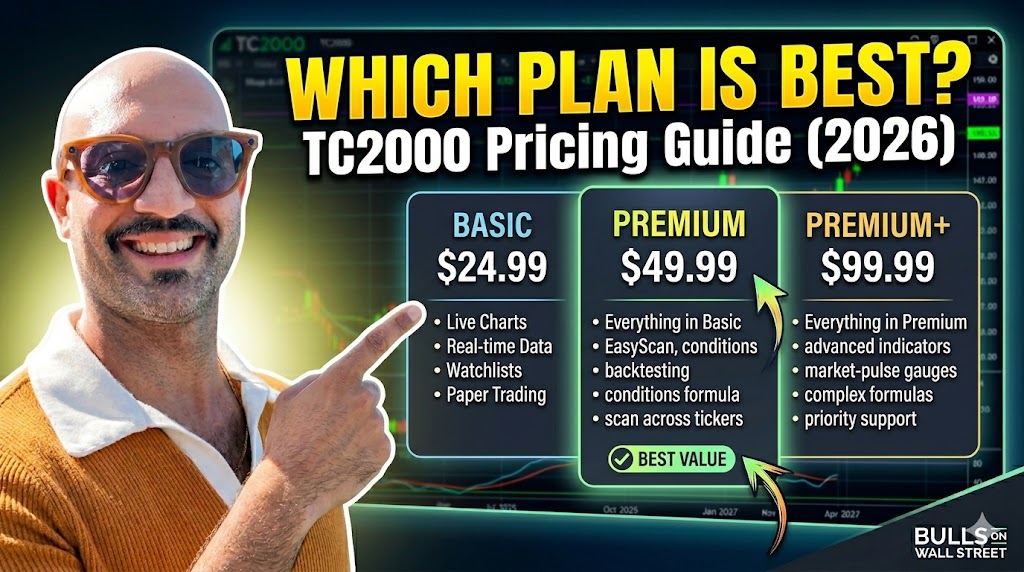
Here is the short version: TC2000 pricing starts at $24.99 per month for Basic and goes up to $99.99 per month for Premium+. All plans include real-time U.S. stock data at no extra charge. And if you sign up through the Bulls on Wall Street referral link, you get $40 off your first month — which means you can try the Premium plan for under $10.
Below is every number you need to make the right decision.
TC2000 Pricing: The Complete Breakdown
TC2000 offers three subscription tiers. Here is what each one costs depending on your billing cycle.
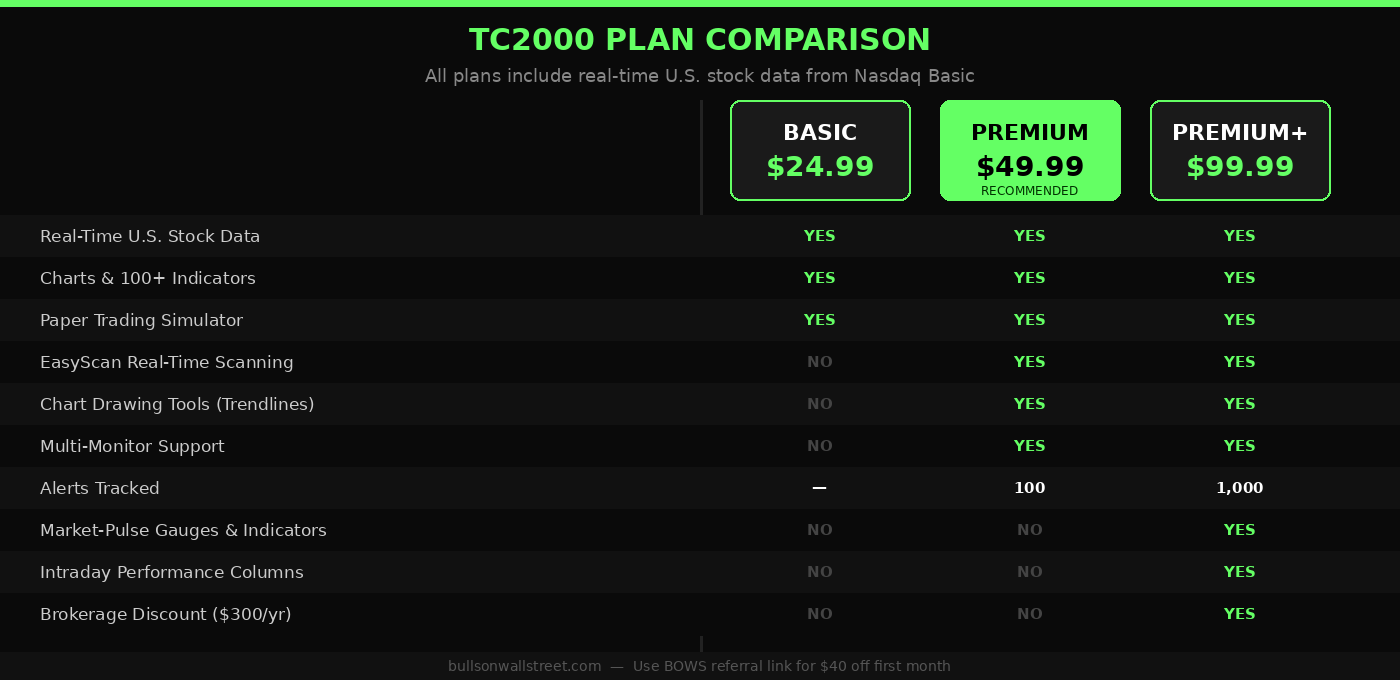
Monthly Billing: - Basic: $24.99/month - Premium: $49.99/month - Premium+: $99.99/month
Annual Billing (17% discount — pay for 10 months, get 2 free): - Basic: $20.82/month effective rate - Premium: $41.65/month effective rate - Premium+: $83.32/month effective rate
Biennial Billing (25% discount — pay for 18 months, get 6 free): - Basic: $18.74/month effective rate - Premium: $37.49/month effective rate - Premium+: $74.99/month effective rate
One important detail most pricing guides miss: Real-time U.S. stock data from Nasdaq Basic is now included in all plans. That used to be a $14.99/month add-on. TC2000 rolled it into every subscription tier. If you saw older pricing guides listing it as a separate cost, they are out of date.
What You Get at Each Plan Level
Basic — $24.99/Month
Basic gives you the charting engine, live streaming watchlists, paper trading, and real-time stock data. It is the entry point.
What it does well: The charts are fast, clean, and accurate. You get over 100 indicators, customizable layouts, and real-time news from MT Newswires. Paper trading is built in, which matters a lot for newer traders still building their process. At Bulls on Wall Street, our bootcamp students spend month two on the simulator before ever touching live capital. Having paper trading built into the same platform they will eventually trade live on creates muscle memory faster than using a separate tool.
What Basic is missing: No real-time scanning. No EasyScan. No custom conditions. No chart drawing tools. You can look at charts all day, but you cannot build the kind of pre-market scan workflow that serious day traders run before 9:30 AM.
My honest take: Basic is good for someone who is brand new, learning the layout, and not ready to scan. But you will outgrow it fast. The scanning tools are the entire reason I use TC2000 over anything else. Without them, you could get similar charting from free alternatives.
Premium — $49.99/Month
This is the plan I recommend for most traders. Premium adds everything that makes TC2000 genuinely powerful.
What you gain over Basic: - Real-time scanning and sorting across thousands of stocks - EasyScan wizard with pre-built conditions and the ability to write your own PCF (Personal Criteria Formula) conditions - Chart drawing tools — trendlines, AVWAP, Fibonacci, all of it - Most Watched and Trending Stocks, updated 24/7 - Morning Pre-Buzz for pre-market activity before the open - Multi-monitor support with floating windows - Up to 100 active alerts - History columns to review past scan results - Morning Pre-Buzz for catching unusual pre-market volume spikes
The scanning capability alone is what sets Premium apart. My morning routine involves running a liquid gainers scan, a top losers scan, and a high-of-day scan before the open. TC2000's EasyScan runs those across thousands of symbols in seconds. I can download Kunal's momentum scanner directly here — that scan is configured for the stocks I actually trade. Being able to share an exact scanner setup like that with 7,000+ students is not something every platform allows.
For traders following the Bulls on Wall Street day trading strategies, the Premium plan covers everything you need to execute the BOWS system — ORB setups, quick pullback buys, VWAP bounces, intraday flag breakouts. The scanner finds the names. The charts tell the story.
Premium+ — $99.99/Month
Premium+ is the full version of TC2000. It adds the tools that professional-level traders use for market-wide analysis.
What you gain over Premium: - Real-time Market-Pulse gauges — a live gauge that shows how many stocks in your watchlist are meeting your conditions right now - Real-time Market-Pulse indicators — plot breadth data historically so you can build your own market timing indicators - Live auto-refreshing filters and sorts (not just on-demand scans, but continuously updating watchlists) - Intraday Performance Columns to see how stocks behaved at specific points earlier in the day - Up to 1,000 active alerts (vs 100 on Premium) - A $300/year brokerage discount if you maintain a TC2000 Brokerage account with a $30,000 balance or make at least one trade per month
That $300/year brokerage discount is a real consideration. If you are already trading through TC2000 Brokerage and keeping $30,000 in the account, the discount drops Premium+ from $1,199/year down to $899/year — which makes it cheaper annually than Premium at $499.80/year plus the brokerage discount doesn't apply.
Who needs Premium+: Traders who want to run custom market breadth indicators built from their own conditions. The specific tools that make Premium+ worth it — the real-time Market-Pulse gauges, the Market-Pulse indicators, and the intraday performance columns — are not available at the Premium tier. The gauges are a compact real-time read on how many stocks in your watchlist are meeting your conditions at any given moment. The Market-Pulse indicators let you plot those breadth readings historically and build your own custom market-timing overlays. The intraday performance columns show you how stocks behaved at specific earlier points in the day — useful for reviewing setups and understanding when momentum shifted. If you are tracking T2108 and want to build your own reads around it, this is where it lives.
Who doesn't need Premium+: Most individual day traders and swing traders. The Premium plan handles 95% of what the BOWS system requires. Premium+ is for traders who have outgrown the core workflow and want to build systematic market-timing frameworks on top of it.
Optional Add-On Data Feeds
On top of the base subscription, TC2000 offers several optional data feeds billed monthly:
- Real-Time U.S. Indexes: $9.99/month
- Real-Time U.S. Options: $9.99/month
- Dow Jones News Delayed: $1.50/month
- Dow Jones News Real-Time: $2.50/month
- Extra Alerts 100: $10.00/month
- Extra Alerts 500: $25.00/month
- Consolidated Tape: $14.99/month
For day traders, the one add-on worth considering is Real-Time U.S. Options at $9.99/month if you are actively trading options contracts. The Real-Time U.S. Indexes feed is useful for traders who want live index data plotted directly in TC2000 alongside individual stock charts.
The Consolidated Tape at $14.99/month gives you all exchange data consolidated in one feed. Most traders using TC2000 alongside a brokerage that already provides Level 2 data do not need this.
The BOWS $40 Discount
If you have not subscribed to TC2000 yet, use the Bulls on Wall Street referral link for $40 off your first month.
Here is what that means in practice:
Premium plan at $49.99/month minus $40 = $9.99 for your first month. You are testing the core TC2000 day trading workflow — scanning, charting, alerts, multi-monitor layouts — for under $10. That is less than most traders spend on a single lunch.
After the first month, you are back to the regular rate. But by that point you will know whether TC2000 fits your trading process. In my experience, traders who come from free tools almost always stay once they see what real-time scanning actually looks like at speed.
Annual vs Monthly: When the Math Makes Sense
The annual plan saves 17% — or roughly two free months per year. At Premium, that is $49.99 per month monthly versus $41.65 per month annually — a savings of $99.84 per year.
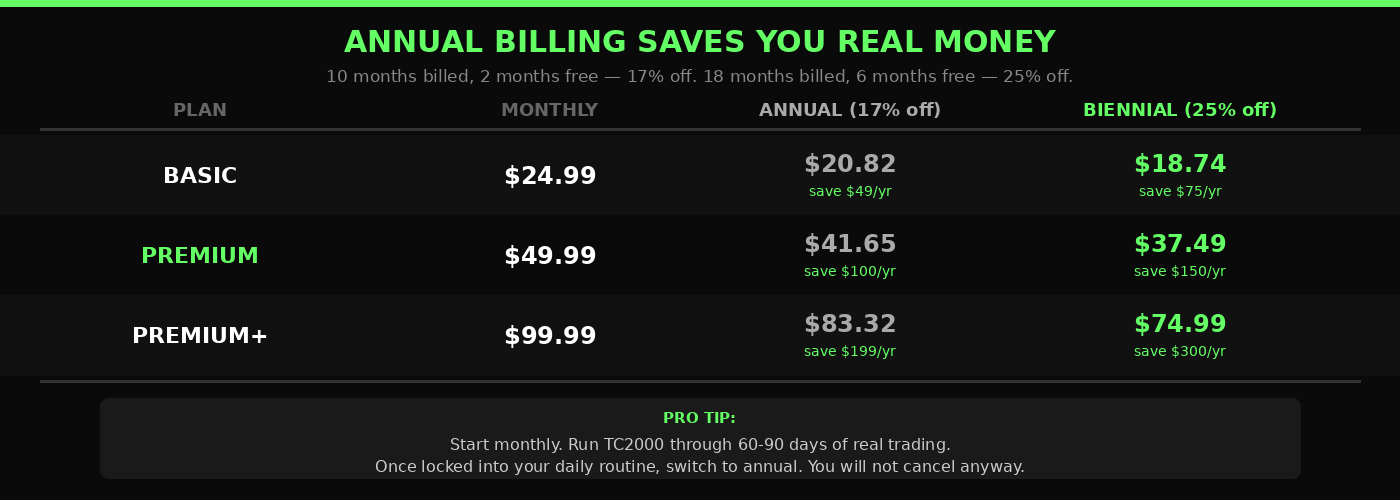
The biennial plan saves 25% — roughly six free months over two years. At Premium, that drops to $37.49/month effective, saving $149.88 per year compared to monthly.
My recommendation: Start monthly. Try TC2000 for 60 to 90 days. Run it through your actual trading routine — pre-market scans, intraday charting, alert management. If you are still running the same workflow at 90 days, switch to annual. The savings are real and add up. If you are a newer trader still in simulation mode, stay monthly until you have consistent data on your trading results.
One more note on billing: TC2000 charges for annual and biennial subscriptions upfront. Annual is 10 months billed at once, and you receive two months free. Biennial is 18 months billed at once with six months free. Make sure your trading account is funded and your process is stable before locking into a longer term.
The TC2000 Brokerage Discount
TC2000 has an integrated brokerage through TC2000 Brokerage, Inc., a FINRA and SIPC registered broker-dealer. If you trade through TC2000 Brokerage and either maintain a $30,000 account balance or place at least one trade per month, TC2000 automatically applies a $25 monthly credit to your software subscription.
That is $300 per year in software savings just for keeping your trading account active with TC2000. For Premium+ subscribers, that credit offsets nearly 25% of the annual cost.
One caveat: TC2000 Brokerage charges $4.95 per stock/ETF trade and $2.95 plus $0.65 per contract for options. According to SEC guidance on brokerage costs, commission structures vary widely across brokers — compare carefully against your current setup before switching entirely for the software discount. Most active traders I know keep TC2000 as their charting and scanning platform and execute through a separate commission-free brokerage.
For a full review of TC2000's features beyond pricing, see the complete TC2000 review.
TC2000 Pricing vs the Competition
Traders often ask how TC2000 stacks up against alternatives. Here is the honest comparison.
TradingView: TradingView Pro runs $14.95/month ($12.95 billed annually). For basic charting, watchlists, and screeners, TradingView is less expensive. But TC2000's EasyScan processes real-time scans on its own servers — not client-side. That speed difference matters when you are scanning thousands of symbols at 9:25 AM and need results in two seconds, not 30. TradingView also lacks the PCF (Personal Criteria Formula) functionality that lets you write custom conditions for any technical concept you can define. I cover this in more depth in the TC2000 vs TradingView comparison.
Thinkorswim (TD Ameritrade / Schwab): Thinkorswim is free with a brokerage account. Its scanning tools are powerful, particularly for options traders. But the charting speed and the layout customization in TC2000 are in a different category. TC2000 lets you build and save multiple layouts — one for pre-market scanning, one for active day trading, one for swing trade review — and flip between them instantly. The layout I use for day trading is available for direct import at tc2000.com/~TCwSwf.
StockCharts: Good for weekly and monthly chart work. Not built for active scanning or intraday day trading. If you are looking at weekly base breakouts or longer-term swing setups, StockCharts works. If you are scanning for momentum at the open, it is not the right tool.
The platform you use for charting shapes your trading. Every pattern you identify, every pullback you time, every scan result you act on — it all runs through your charting software. Using a slower, less capable tool costs you in ways that are hard to measure but real: slower scans, missed setups, clunkier execution. TC2000 has been voted the best stock software by Stocks and Commodities Magazine readers for more than 26 consecutive years. That is not a marketing line. That reflects sustained performance across thousands of professional trading setups.
Which TC2000 Plan Should You Get?
Here is the direct answer based on where you are in your trading journey.
Brand new to trading (less than 6 months of experience): Start with Basic or Premium monthly. You need to learn the platform, build your watchlists, and set up your charting workflow. Use the simulator. Paper trade for at least two weeks before risking real capital. The BOWS system requires students to simulate before going live — the platform matters less than the process at this stage.
Active trader building your workflow (6 months to 2 years): Get Premium. The scanning tools, EasyScan, chart drawing tools, and alerts are the engine of the BOWS pre-market routine. You cannot run the liquid gainers scan or pre-market gappers scan without Premium's real-time scanning capability. If you are following the pre-trade entry checklist and running proper risk management, you need the scanning functionality.
Experienced trader with a systematic approach: Consider Premium+. The cost difference is not significant once trading is your full-time business. What you get for the extra money: the real-time Market-Pulse gauges, the Market-Pulse indicators, and the intraday performance columns. Those gauges let you build custom breadth reads you simply cannot construct at the Premium tier. If seeing real-time market internals plotted the way you want them is part of your process, Premium+ is the right call. The $300 brokerage credit can bring the effective annual cost down significantly if you are already using TC2000 Brokerage.
Is TC2000 Worth It?
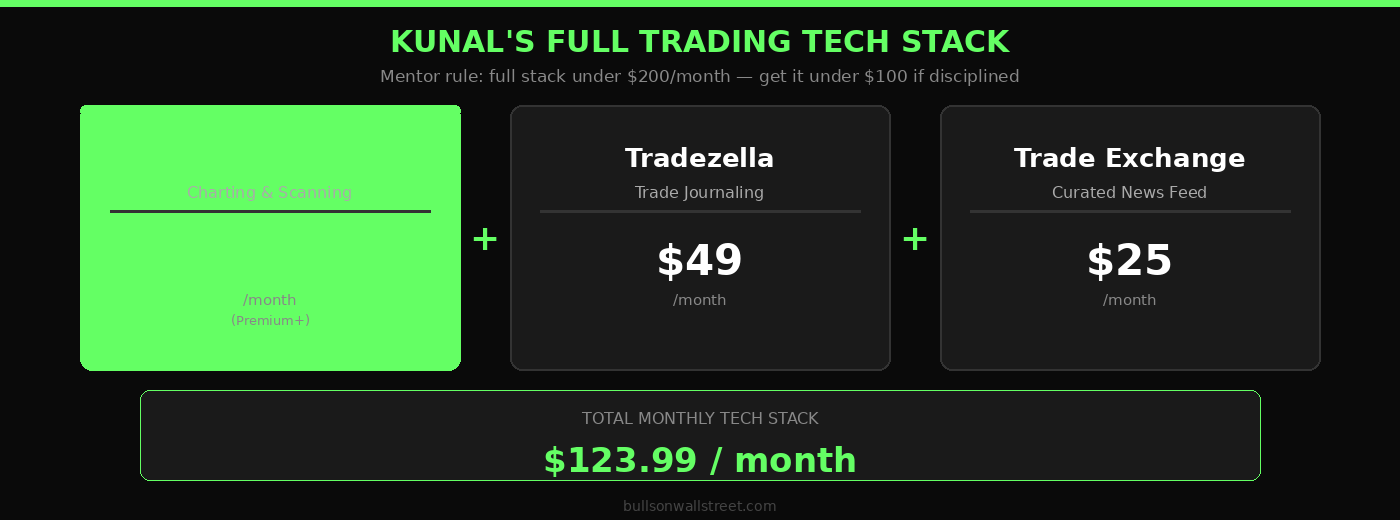
My mentor Paul Singh had a rule he drilled into me early: do not waste money stacking tools. He said your entire tech stack should cost under a couple hundred dollars a month — and if you are disciplined about it, you can get it under $100. One platform, maybe two. Everything you actually need, nothing you don't.
I have followed that philosophy my whole career. My current setup is three tools. Tradezella at $49 a month for journaling — the analytics on your own trading data are genuinely unique and worth it. The Trade Exchange at $25 a month for a curated news feed that cuts the noise and saves me real time every morning. And TC2000 for charting and scanning. That's the full stack. Between those three I have journaling, news, and charting covered. Now, could I theoretically do all of this inside TC2000? Yes — it has news, notes, alerts, everything. But I find the journaling features in Tradezella and the news curation in Trade Exchange are better at those specific jobs. Use the right tool for each piece.
I have paid for TC2000 every month for nearly 20 years. I have never canceled. That is my answer.
More specifically: TC2000 at $49.99/month for Premium replaces what used to require two or three separate subscriptions — a charting platform, a real-time scanning tool, and a news feed. Real-time U.S. stock data is included. EasyScan runs on TC2000's own servers. The alerts, the multi-monitor layout system, the PCF formula capability — all of it is built into one subscription.
For traders who take the craft seriously, that is not expensive. It is the cost of professional-grade tools. The FINRA regulated brokerage integration, the speed of the scan engine, the indicator library — TC2000 is built for active traders, not passive investors checking charts once a week.
If you are in the learning phase, using the position sizing calculator approach to manage risk on every trade, and building real screen time, TC2000 is the platform that will grow with you. Start with the BOWS $40 discount, try Premium for your first month for under $10, and see what real-time scanning looks like in practice.
FAQ: TC2000 Pricing Questions
How much does TC2000 cost per month?
TC2000 costs $24.99/month for Basic, $49.99/month for Premium, and $99.99/month for Premium+. All plans include real-time U.S. stock data. Annual billing reduces the effective monthly rate by approximately 17%, and biennial billing reduces it by approximately 25%.
Does TC2000 have a free plan?
Yes — TC2000 has a free access tier, though it is not a full plan like Basic or Premium. You can download and run TC2000 at no cost with delayed data and a basic layout. That free mode includes U.S. stocks and options, charts, indicators, an options chain, a basic watchlist, and unlimited paper trading. What you do not get is real-time data or the advanced scanning tools. New accounts and accounts that have been inactive for a long time can also access this mode without a credit card — it functions essentially as a risk-free way to learn the platform before paying for anything. For active traders who need live data and EasyScan, the free tier will hit its ceiling fast. But for someone who just wants to get comfortable with the layout and practice paper trading before committing, it is a legitimate starting point. The 30-day money-back guarantee applies to paid subscriptions as well — cancel within 30 days and TC2000 refunds the charge.
What is the difference between TC2000 Basic, Premium, and Premium+?
Basic gives you charting, watchlists, paper trading, and real-time stock data. Premium adds real-time scanning via EasyScan, chart drawing tools, PCF (Personal Criteria Formula) capability, multi-monitor support, and up to 100 alerts. Premium+ adds live auto-refreshing watchlists, real-time Market-Pulse gauges, historical condition testing, up to 1,000 alerts, and a $300/year brokerage discount.
Is real-time data included in TC2000?
Yes. Real-time U.S. stock data from Nasdaq Basic is included in all TC2000 plans at no additional cost. Optional data feeds for U.S. indexes ($9.99/month), U.S. options ($9.99/month), and other sources are available as add-ons.
Can I get a discount on TC2000?
Yes. Signing up through the Bulls on Wall Street referral link gives you $40 off your first month. Annual billing saves approximately 17% vs monthly, and biennial billing saves approximately 25%. TC2000 Brokerage account holders who trade at least once per month or maintain $30,000 in the account receive an automatic $25/month credit toward their software subscription.
Which TC2000 plan is best for day trading?
Premium is the right plan for most day traders. It includes the real-time EasyScan functionality, pre-market activity data, chart drawing tools, and the alert system that active traders need. Premium+ adds advanced breadth analysis tools that are useful for systematic traders but not required for the core day trading workflow.
Is TC2000 better than TradingView for day trading?
For active day traders focused on U.S. stocks and momentum strategies, TC2000's scanning speed and layout customization have a real edge over TradingView. TradingView is more affordable and covers more global markets, but TC2000's EasyScan runs on dedicated servers and processes thousands of symbols in two seconds. For the pre-market routine at BOWS, TC2000 is the tool. See the full TC2000 vs TradingView breakdown for the detailed comparison.
Does TC2000 offer a free trial?
TC2000 does not advertise a traditional free trial, but new subscribers are covered by a 30-day money-back guarantee. If you cancel within 30 days of your first subscription, TC2000 refunds the charge. This effectively functions as a 30-day risk-free trial period.
What is the TC2000 annual plan cost?
Annual billing for TC2000 is structured as 10 months of payment with 2 months free. The effective monthly rates are: Basic at $20.82/month, Premium at $41.65/month, and Premium+ at $83.32/month. The full annual charge is billed upfront.
Can you use TC2000 on a Mac?
TC2000's desktop software is Windows-native. Mac users can access it through the TC2000 web platform at webplatform.tc2000.com, or by running Windows on their Mac via Parallels Desktop or a virtual machine setup.
Start Trading with TC2000
TC2000 is the charting and scanning platform I have used through every market cycle since the early 2000s. Every scan I run, every momentum setup I track, every layout I build with students in the Bulls on Wall Street 60-Day Live Trading Bootcamp runs through TC2000.
If you are serious about learning to trade momentum stocks with a system that has trained 7,000+ students, start where we start. Use the BOWS referral link for $40 off your first month and download Kunal's trading layout directly so you are running the same setup from day one.
The tools do not make the trader. But the right tools stop being the obstacle between you and doing the actual work.
Want to go deeper on building a complete trading system? The 60-Day Live Trading Bootcamp covers scanner setup, risk management, entry and exit execution, and live market exposure with Kunal trading alongside you in real time. Learn what the platform can do in the hands of someone who has been running it for two decades.
About the Author
Kunal Desai is the CEO and founder of Bulls on Wall Street. A professional trader since 2007, he has navigated every major market cycle -- from the 2008 financial crisis to today's high-volatility environments. Having mentored 7,000+ students through his live trading bootcamps, Kunal trades live every morning in the Bulls on Wall Street Trading Chatroom and is dedicated to teaching real-world execution and high-probability strategies. Based in Miramar Beach, Florida.
Connect with Kunal: Read his full story | Instagram | YouTube