

Updated October 2026
The best stock trading tools for day trading are a charting and scanning platform, a fast broker, a trade journal and a curated news feed. Everything else is optional. I have traded full-time since 2007 and taught 7,000+ students through the 60-Day Trading Bootcamp, and the stack I tell every student to buy costs about $118 a month. The stack you need on day one costs about $20.
Disclosure: some links in this post are referral or partner links, including TC2000, Tradezella, The TradeXchange and SageTrader, and TheTradeMakers is my own prop firm. Bulls on Wall Street may receive a commission, and some links carry a reader discount. I only list tools I use or have used myself.
Most trading tools are fluff. Good-looking fluff, some of it. But a trader needs a handful of things, and the order you buy them in matters more than which logo is on the screen.
TL;DR
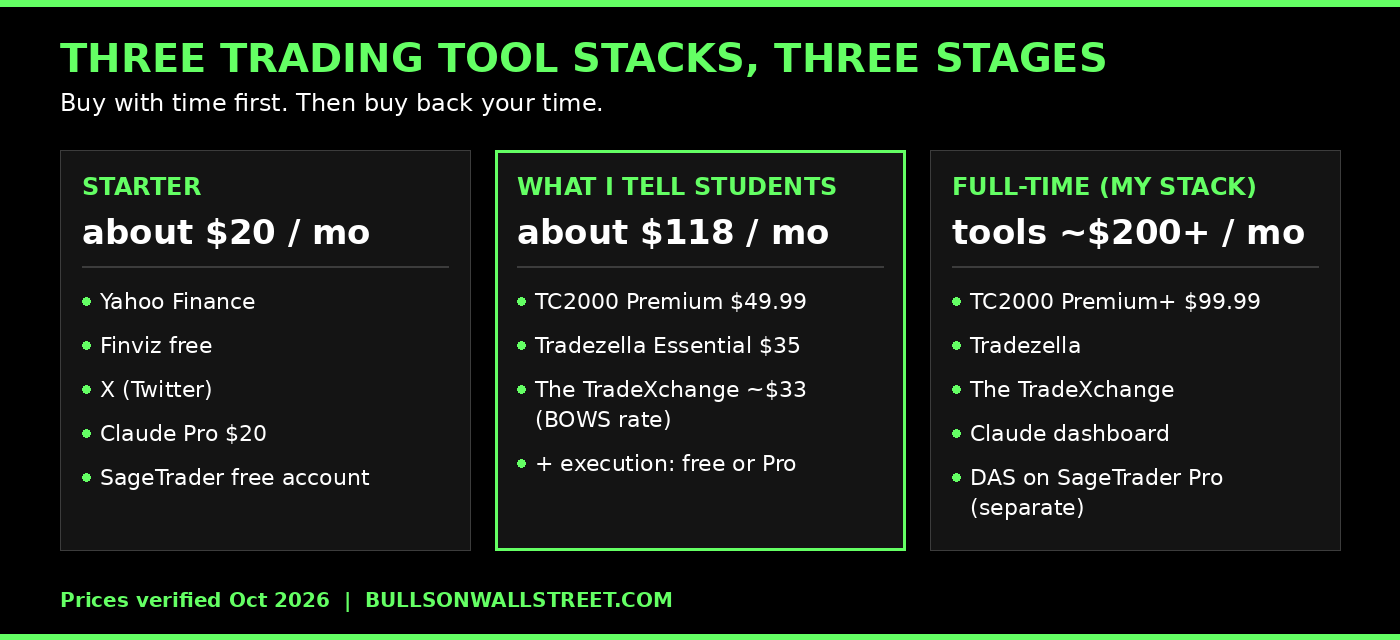
- Starter stack (about $20/month): Yahoo Finance, Finviz free, X, a Claude subscription and the free SageTrader account. You pay with time instead of money.
- The stack I tell my students to buy (about $118/month): TC2000 Premium, Tradezella and The TradeXchange through the Bulls on Wall Street discount.
- My own stack: TC2000 Premium+ for breadth gauges, DAS Trader on SageTrader Pro, Tradezella, The TradeXchange and a Claude dashboard I built myself.
- What I dropped or barely use: Trade Ideas and Benzinga Pro. Both are excellent. Both were too much for how I trade.
- The biggest waste of money: stacking chat rooms, Discords and courses that teach conflicting strategies, plus AI signal services and copy trading.
Trading Is a Small Business. Fund It Like One.
When you open a restaurant, you do not hire a staff of twenty on day one. You are the cook, the cleaner, the server, the chef and the CEO. You do the work by hand until the business can carry its own bills, and then you hire help one role at a time.
Trading works the same way.
In the beginning you can do almost everything manually. Pull charts on Yahoo Finance. Run a free Finviz screen. Read news on X. Pay $20 a month for Claude and have it do the grunt work of summarizing what you are looking at. You will hop from website to website and it will cost you an extra 30 to 40 minutes a day. That is fine. You are saving the money.
Once trading starts paying its own way, the math flips. For me, saving 30 minutes a day across 22 trading days is 11 hours a month. Those hours are worth thousands to me. I have a 2-year-old at home, a business to build and a market to focus on. A couple hundred dollars a month in tools to buy that time back is the easiest decision I make.
So this list is built in stages. Buy with time first. Then buy back your time.
What Every Trader Actually Needs
Strip the marketing off and there are four jobs.
- A broker that executes fast. Somewhere you can set up buttons and hotkeys and get good fills.
- A real charting and scanning platform. This is the one worth paying for, and it is the most important tool on the list.
- A journal. If you are not reviewing your trades, you are repeating them.
- A news feed you can actually process. Curated beats comprehensive for 99% of traders.
Everything else is optional until it proves otherwise.
1. TC2000: The Charting Platform Worth Paying For
If you are depending on your broker's charts, you will not be able to build proper lists or run proper scans. A lot of traders use thinkorswim for charts because it is free and it has a lot of pizzazz. Most of them do not even place their trades there. I still have a legacy thinkorswim account at Schwab for swing trading, and honestly I am not a fan. It is not a great tool for getting organized, building lists, scanning sectors and flipping through everything you need visually.
I chart and scan on TC2000. Three reasons.
Layouts. I run multiple layouts for different jobs: a six-window layout that my students see when I stream, a scanning layout, an index layout, a breadth layout. I can drag a layout to another monitor and it lives there. TC2000 is the only charting platform I have seen that handles this as cleanly.
Clean charts. The candles are the right size and the right width at the right scale. On some platforms patterns are genuinely hard to see. That is not the case here.
Scans you write yourself. You can build basic scans with EasyScan, and you can write your own criteria with PCF formulas (Personal Criteria Formulas). If you can describe it, you can scan for it.
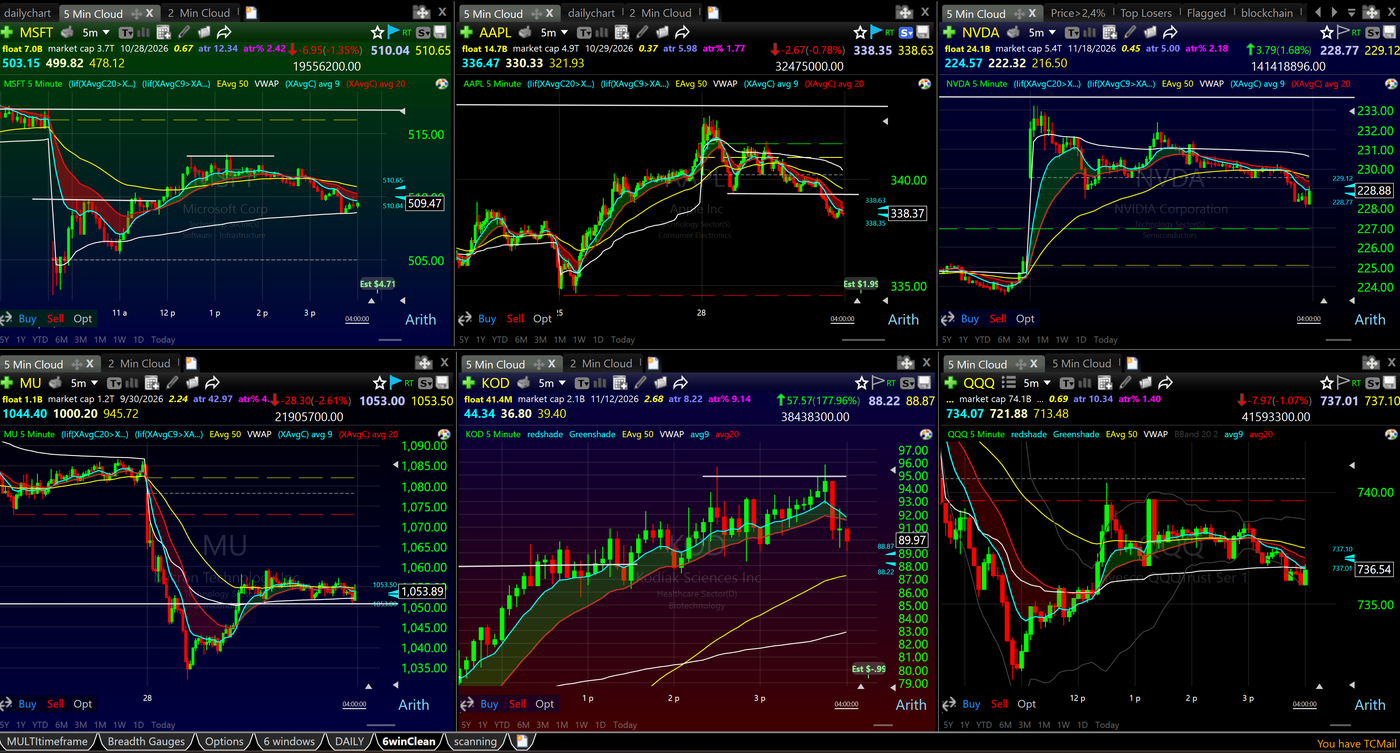
Every chart in that layout is a 5-minute chart with the Bone Zone shaded between the 9 and 20 EMA, plus VWAP and the 50 EMA. The header on every chart shows float, market cap, the next earnings date, ATR and ATR percent. I do not have to go looking for any of it.
Premium or Premium+?
I tell every student the same thing: get Premium. At $49.99 a month it has 98% of what you will ever use, including real-time scanning, PCFs, multi-monitor layouts and drawing tools. Premium+ at $99.99 adds the last few features, mainly Market-Pulse breadth gauges and live auto-refreshing scans. I use those. Most traders do not need them for a long time. Sign up through the Bulls on Wall Street link and you get $40 off your first month.
For the full plan breakdown, see the TC2000 pricing guide.
The Part Most Tool Lists Skip: Breadth
TC2000 does more than scanning. You can turn a scan into a visual gauge. I keep gauges for the number of stocks up 4% today, up 25% in a month, up 25% in a quarter and up 50% in a month, with the matching down counts underneath. That tells me more about the real strength of the market than a typical advance/decline number.
My favorite breadth indicator is T2108, one of TC2000's own Worden T2 indicators. It measures the percentage of NYSE stocks trading above their 40-day moving average. I use it to read oversold and overbought on a breadth basis. Below 20 is an oversold market.
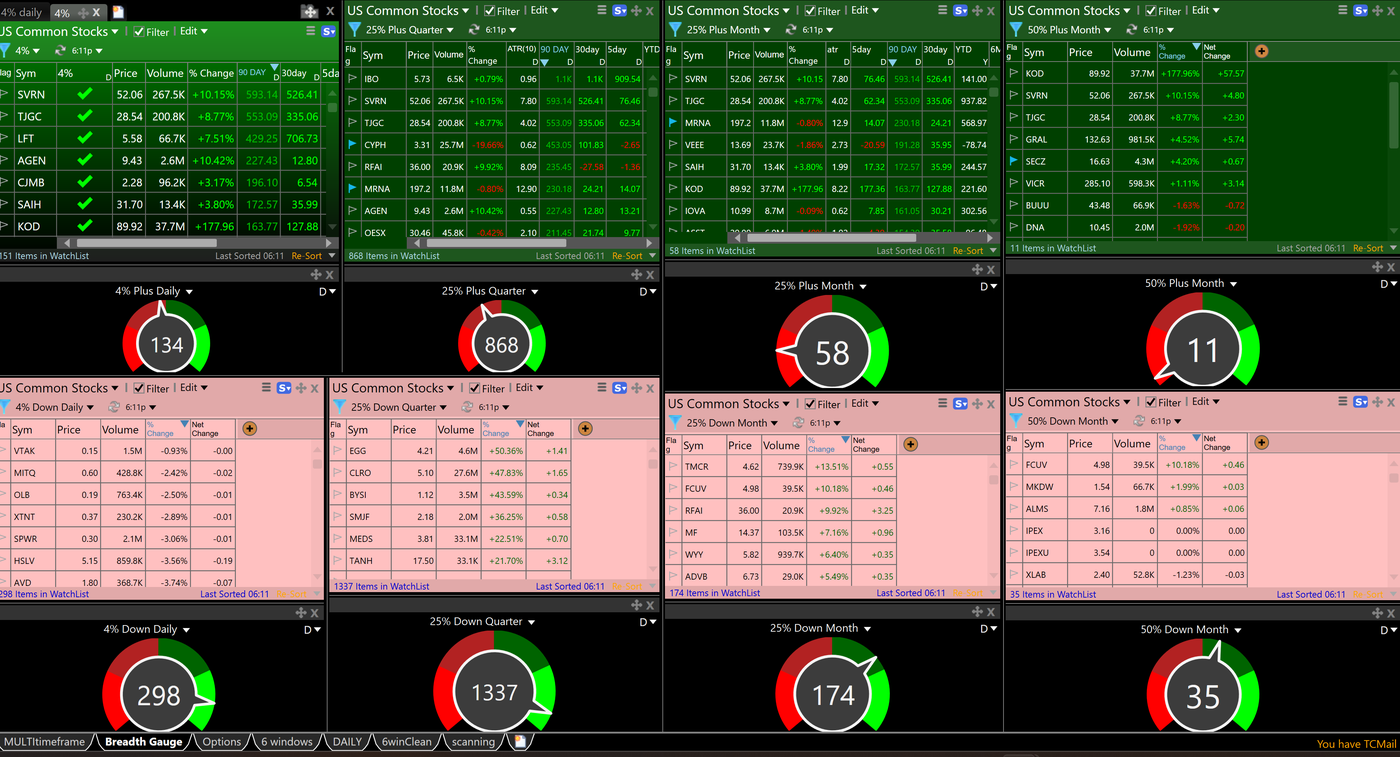
So the layouts stack up like this. The six-window watches my names. The scanning layout finds them. The breadth layout tells me whether the tape is worth trading at all.
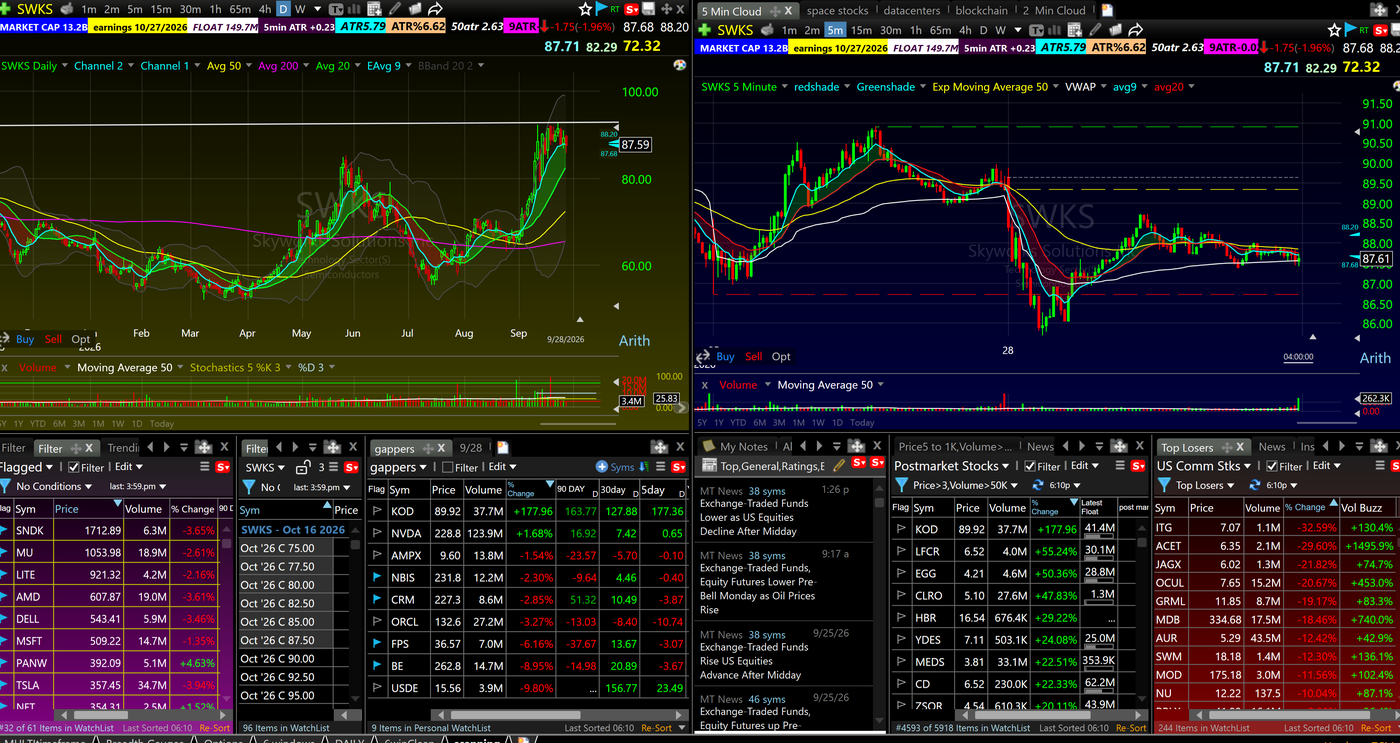
One column on that scanning layout is worth pointing out. 50atr shows how many ATRs a stock sits above its 50-day moving average. That is my ATR Extension Rule built straight into the screen: 7 or more ATRs above the 50-day and I will not swing it, period. I can still day trade it hard off the 5-minute chart, because those extended names often carry the biggest ranges on the board.
2. Your Broker: Start Free, Upgrade When You Need Speed
Execution is the one tool you cannot fake. You need buttons, you need hotkeys, and you need fills that do not slip.
I execute on DAS Trader through SageTrader Pro. I also trade a second account on BlackArrow through TheTradeMakers, the prop firm I run. SageTrader is a member of FINRA and SIPC, and you can confirm any broker's registration and history yourself on FINRA BrokerCheck before you send them a dollar.
Here is how I would sequence it.
Starting out: the free SageTrader account. $100 minimum, commission-free on US equities. It runs the basic BlackArrow web platform. I have used it. You can trade straight from the charts and set up your own buttons. No options and only easy-to-borrow shorts, which is fine when you are learning.
Once you are going: SageTrader Pro with DAS. $3,000 minimum, commissions from $0.0003 per share, real hotkeys, direct routing and a locates router for hard-to-borrow names. The DAS platform runs $125 a month plus $15 for non-professional Level 1 data. That is a cost of doing business, like rent for the restaurant, so I keep it separate from the tool budget.
The chart-trading point matters more than it sounds. I will show you why in the journal section.
3. Tradezella: The Journal That Changed the Category
I journal on Tradezella. It is the first journal that added the features you actually need instead of just a spreadsheet of fills.
You can backtest on it, manual or automated, including your own strategies. And it has trade replay. When I have a nasty trade or a really good one, I replay it at 10X speed to get the repetitions in, so I know exactly what went right or wrong and it gets burned into my brain.
Here is a real one.
On October 6 I bought QQQ 0DTE calls twice. Perfect entry both times, right around the 1.40 to 1.60 area near 10:30. And I sold both times almost immediately. The contract ran to about 3.00 by 11:10, riding above the 9 and 20 EMAs the entire way.
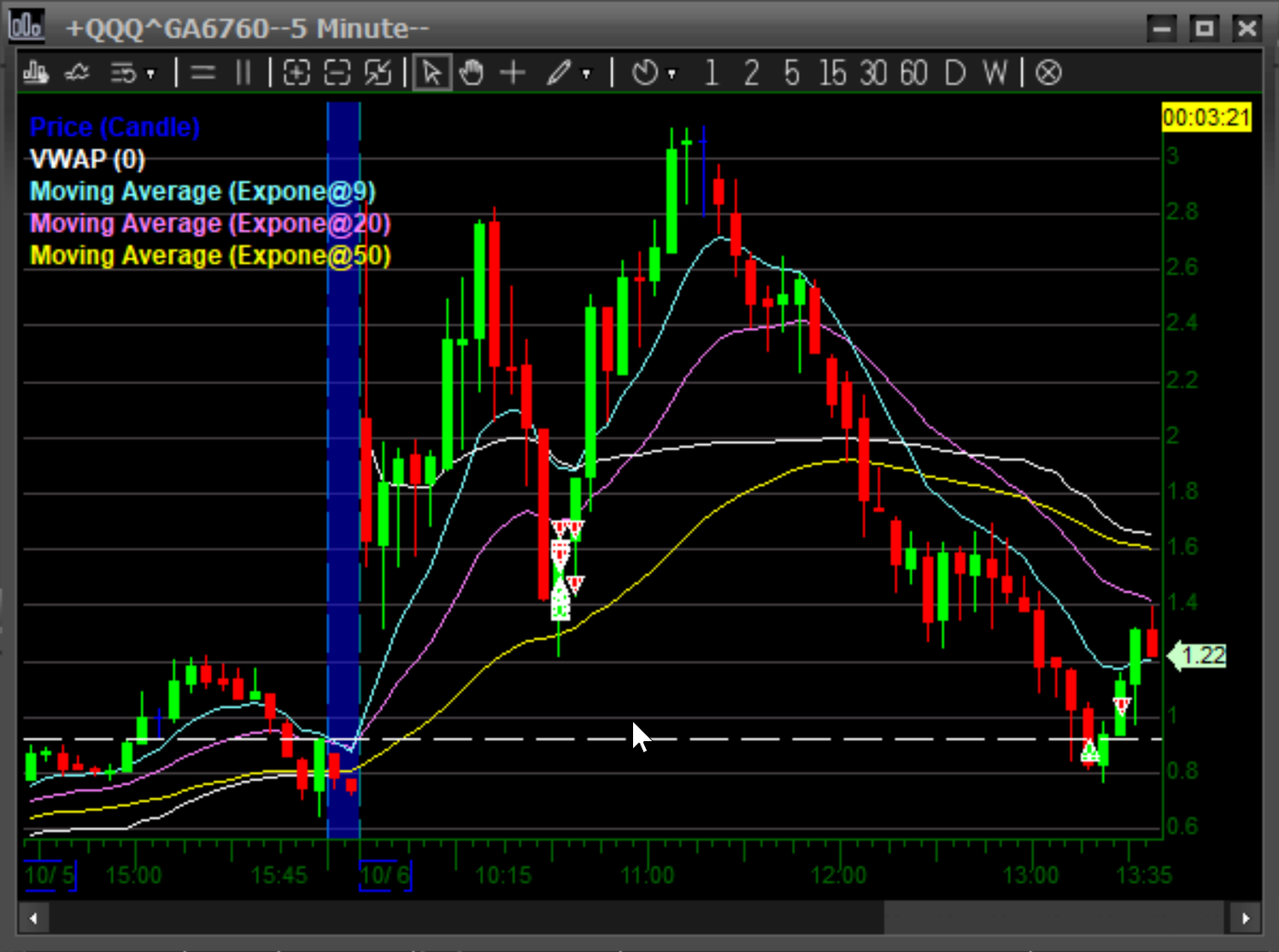
I replayed that trade over and over in Tradezella. Here is what changed. Now I scale out half quickly, move a flat stop to entry on the rest, and drag that stop up from the chart, loosely, along the EMAs. That is the Free Trade playing out in real time, and dragging the stop off the chart is exactly why the execution platform matters.
A note on that trade: 0DTE options are a high-risk instrument. FINRA's own primer on 0DTE options is worth reading before you ever touch one. The lesson here is exits.
Tradezella plans start at $35 a month for Essential, with Pro at $59 and Ultra at $99 under the pricing that took effect July 14, 2026. Essential already includes backtesting and replay.
4. The TradeXchange: News Without the Overload
For news I use The TradeXchange. There are a lot of news feeds out there. I like this one because it is curated for professionals. You get a clean feed, the ability to search for news, a squawk, and a set of reports: a premarket report that gets you ready for the open, a nightly market summary and a weekly wrap.
Through the Bulls on Wall Street page it is $99 a quarter, which is $20 off the regular quarterly rate, and the discount recurs. About $33 a month.
Could Benzinga Pro do more? Yes. More sources, more features, more of everything. For 99% of traders, a curated feed with search is better, because it keeps you from getting overwhelmed.
The Stack I Tell Every Student to Buy
Put those three together and you have the stack I recommend to every student who is past the starter stage.
- TC2000: Premium, $49.99
- Tradezella: Essential, $35.00
- The TradeXchange: Bulls on Wall Street quarterly rate, about $33.00
- Total: about $118
I made a video on this stack a while back when it came in under $100. Tradezella's 2026 pricing change and quarterly billing on The TradeXchange put it at about $118 today. Same three tools, same reasoning.
Execution sits on top of that: free on the SageTrader starter account, or the DAS platform fee once you move to Pro.
How I Use Every Tool in a Trading Day
A list of tools tells you nothing. Here is how they actually run, start to finish.
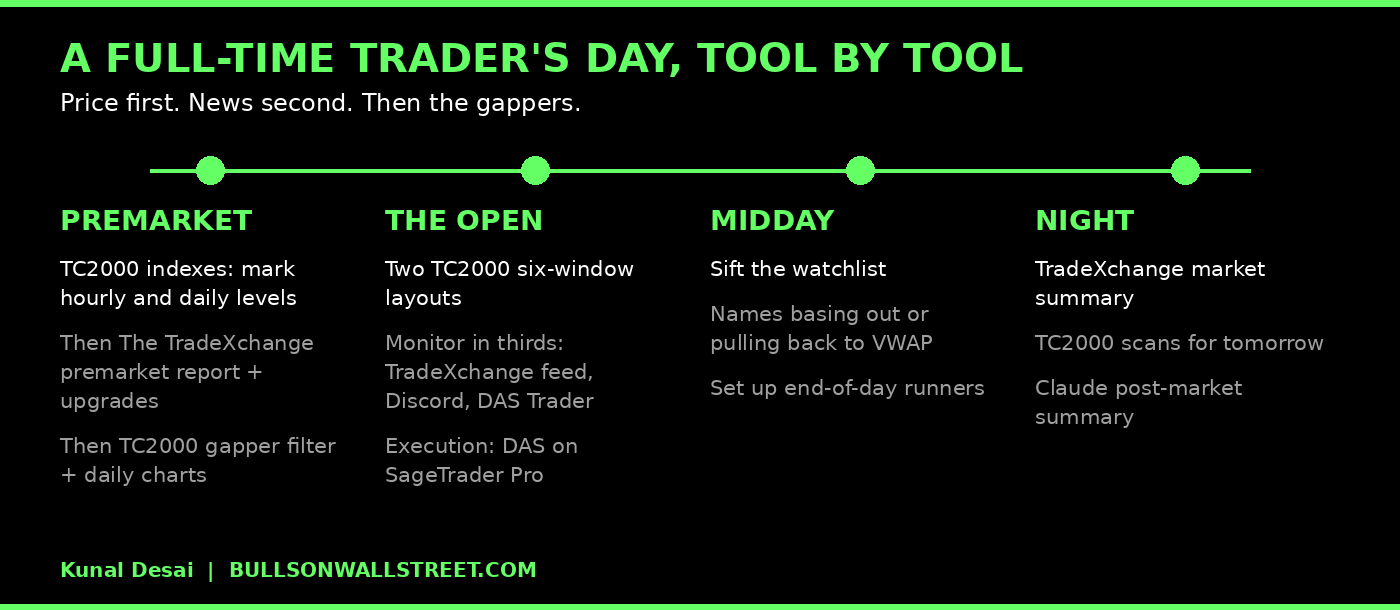
Premarket, price first. The first thing I do at the computer is open TC2000 and go through the indexes. I mark the levels that matter on the hourly and daily timeframes. I do this before I read a single headline, because I want an unbiased read of price action before I throw news into it.
Premarket, then news. Next I read The TradeXchange premarket report and sift the news flow: upgrades, downgrades, anything significant moving around. I usually run it side by side with TC2000 and check the news against what price already told me.
Premarket, the gappers. Then I go through the premarket gappers, which is just a filter in TC2000. Which stocks have earnings out, which are gapping on news, and what their daily charts look like. The full routine is in my guide to scanning for explosive stocks.
The open. Two TC2000 six-window layouts plus my broker. One monitor is split in thirds: The TradeXchange feed, my Discord and DAS Trader.
Midday. I sift the watchlist for names basing out or pulling back to VWAP that could make an end-of-day run.
Night. The TradeXchange market summary, my TC2000 scans, and a post-market summary from Claude, which knows exactly what I look for.
The rig. One 43-inch vertical monitor holds three TC2000 layouts: two six-windows and the scanning layout. A second 43-inch vertical holds BlackArrow for my TheTradeMakers account and thinkorswim for my legacy swing and retirement accounts. The full hardware breakdown is in my trading equipment and software guide.
Build Your Own Tools with AI
These days, if you are even a little computer handy, you can build your own tools with Claude or Grok. Plug in your data, connect APIs, have it search for things, and build a dashboard for everything you are watching beyond what your charting platform shows: relevant news, analyst upgrades, links to your journal, P&L reports.
I built myself a life dashboard on Claude that pulls the data points I care about across trading and the business into one view. It is one of my favorite tools, and the subscription is $20 a month.
There is a big difference between building your own AI tools and buying someone else's AI signals. More on that below.
What I Dropped, and What I Barely Use
Trade Ideas: Fantastic, and Not for Me
I used Trade Ideas for years. It is fantastic. It is almost algorithmic in what you can build: you can scan and alert on absolutely anything, and they are creative with layouts and how you put scans together. It looks like a space-age platform and I got some decent results from it.
But for me it was too hard to use. You get a big page of data and numbers, constant clicking to pull up a chart, too much going on. Unless you come from a gaming or programming background, it can be overwhelming. Teaching my students how to use it became a support job of its own, and I had to stop. Frankly, it was distracting.
Where it honestly wins: real-time alert flow. If you want something popping every five seconds, Trade Ideas beats TC2000 for that. I would rather build my scans in TC2000 and write PCFs for anything I need.
Benzinga Pro: A Command Station I Rarely Open
I still have a Benzinga Pro subscription, and I rarely use it. It can find news on anything from dozens if not hundreds of sources, with custom alerts for the stocks you care about. Its single-ticker page is excellent: news, press releases, financials, short interest, key ratios and analyst ratings in one place. It gives you that Bloomberg terminal feeling.
But I am a technical trader. I trade catalysts and charts. When I need fundamentals or short interest, it is a cross-check, and frankly you can get a lot of that from Yahoo Finance for free. It is not in the stack I recommend.
The bigger issue is focus. Once the bell rings, it is critical to trade the handful of stocks you prepared, not hunt through a giant platform for new idea flow you did not prepare for in the premarket and cannot quantify. A prop or hedge fund trader is trained to process dozens of variables at once. For a newer trader, and plenty of experienced ones, that flood is just noise. Focus on a handful of names, wait for your moment and capitalize.
Where Traders Waste the Most Money
Too many traders spend money before trading pays them anything. Here is where it goes.
Indicators. Bought off TradingView or thinkorswim before the trader can read a plain chart.
Disconnected education. This is the big one. Traders buy class after class and join room after room with no rhyme or reason. None of it connects, and the strategies conflict. When you try to piece together too much different stuff, it falls apart. That is why my 60-Day Trading Bootcamp is one coherent strategy, trend and momentum trading and everything that goes with it, taught by me, start to finish.
Options flow and big-buyer alert services. Random tools to tell you someone big is buying. Not worth it.
AI algo alerts and copy trading. None of it is going to help you, in my opinion. Regulators have issued a joint investor alert on AI-related investment fraud, and the pattern they describe is exactly what these services sell. Building your own Claude dashboard organizes your process. Buying someone else's AI signals hands your decisions to a stranger.
How to Choose a Chat Room Worth Paying For
I am all for joining a chat room. The right one.
The right one has real traders in it, runs a coherent strategy and teaches while they trade. It costs money because a real person is doing real work. What I am not a fan of is the free-for-all Discord: endless channels, 100,000 members, mostly nonsense and usually somebody pumping a stock.
About 95% of my Discord has finished the 60-Day Trading Bootcamp. These are focused traders who run the same strategy I do, so we are essentially looking at the market together. I have hundreds of trained eyes on the kind of momentum stocks I want to trade, and that is a huge advantage.
There are good ones out there besides mine. Investors Underground is a focused room. My buddy Ariel Hernandez runs Market Pulse, built on a trend-trading swing strategy, so if you want to learn to trend trade on the swing side, that is a great place to start. I compare more of them in my list of the best day trading chatrooms.
FAQ: Stock Trading Tools for Day Trading
What tools do you need to start day trading?
Four: a broker with fast execution, a charting and scanning platform, a trade journal and a news source. You can start with free versions of most of these and pay for them as trading starts covering its own costs.
What is the best charting software for day trading?
I use TC2000. It handles multiple layouts across monitors, clean charts at the right scale, custom scans with PCF formulas and breadth gauges. Premium at $49.99 a month covers almost everything a day trader needs.
Is TC2000 Premium enough, or do I need Premium+?
Premium is enough for most traders. Premium+ at $99.99 mainly adds Market-Pulse breadth gauges and live auto-refreshing scans. Start on Premium and upgrade when breadth becomes part of your process.
Can you day trade with only free tools?
Yes, at the start. Yahoo Finance, Finviz free, X and a free broker account will get you going. The cost is time, roughly an extra 30 to 40 minutes a day hopping between sites.
How much do day trading tools cost per month?
About $20 for a starter stack, about $118 for the stack I recommend to students, and a few hundred for a full-time setup with a professional execution platform.
Is Trade Ideas worth it?
It is an excellent platform if you want constant real-time alerts and you are comfortable with dense data screens. I used it for years and dropped it because it was hard to use and hard to teach.
Is Benzinga Pro worth it for day traders?
It is powerful for news and fundamentals research. Most traders do not need it. A curated feed like The TradeXchange plus Yahoo Finance for fundamentals covers 99% of what a technical trader uses.
What broker do you use for day trading?
I day trade on DAS Trader through SageTrader Pro and on BlackArrow through TheTradeMakers, my prop firm. I still hold a legacy thinkorswim account for swing trading. Beginners can start on SageTrader's free account with a $100 minimum.
What is the best trading journal?
I use Tradezella. Trade replay at 10X speed and backtesting on your own strategies are the features that changed how I review trades.
Do I need Level 2 to day trade?
Not on day one. Learn to read price action on a clean chart first. Level 2 comes with the professional execution platforms when you upgrade.
Are AI trading signals and copy trading worth it?
No, in my opinion. They hand your decisions to someone else. Use AI to build your own tools and organize your own process instead.
Is thinkorswim good for day trading?
It is a capable broker platform with a lot of features, and I still have a legacy account there. I am not a fan. For day trading charts and scans, I find it hard to stay organized on, which is why I chart on TC2000.
About the Author
Kunal Desai is the CEO and founder of Bulls on Wall Street. A professional trader since 2007, he has navigated every major market cycle -- from the 2008 financial crisis to today's high-volatility environments. Having mentored 7,000+ students through his live trading bootcamps, Kunal trades live every morning in the Bulls on Wall Street Trading Chatroom, where a full-access 7-day trial costs $7. He is dedicated to teaching real-world execution and high-probability strategies. Based in Miramar Beach, Florida.
Connect with Kunal: Read his full story | Instagram | YouTube